Your workflow is unique 👨💻 - tell us how you use Dropbox here.
Forum Discussion

sarasheep
1 year agoExplorer | Level 3
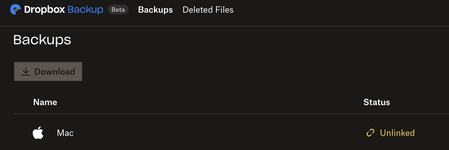
My Mac appears as "Unlinked", syncing icons missing and unable to open files
Anyone experience similar situation?
My Mac is suddenly disconnected from dropbox and on the website it shows "Unlinked".
All my files are missing icons and I cannot open files eit...

sarasheep
1 year agoExplorer | Level 3
Hannah, this is what I see when i hover around over the Dropbox icon, i think it's showing the progress of the back up

Megan Dropbox Community Moderator
1 year agoDropbox Community ModeratorHi sarasheep, thanks for the heads up!
Essentially, the initial screenshot you sent us, with the "unlinked" status, had to do with Dropbox Backup, not the app itself.
Your app seems to be up and running, and still connected to the account, but the Backup isn't.
If you access the app's preferences, and specifically the Backups tab, what do you see when you click Manage Backups?
Also, does the indexing of the files make any progress, or is the file count stuck like that?
- sarasheep1 year agoExplorer | Level 3
Hannah, this is what my backup tab shows, please see below:
Now that my backup has finished, all my previously online files had went local, and the file "mac" has disappeared in my dropbox app.
- sarasheep1 year agoExplorer | Level 3
It's good to know that my files aren't gone, they just went offline and are disconnected from the Dropbox. However, I cannot find a way to reconnect my Mac files to Dropbox Backup...
Thank you.
- Megan1 year ago
Hi sarasheep, when you say that your files went offline, and are disconnected to Dropbox, what do you mean?
Are you referring to the status of these files? Also, are you able to see your Mac files when visiting your account online?
If you wish for your Downloads, Desktop and Documents to be connected to Dropbox Backup, you can try following these steps.
About Apps and Installations
Have a question about a Dropbox app or installation? Reach out to the Dropbox Community and get solutions, help, and advice from members.
The Dropbox Community team is active from Monday to Friday. We try to respond to you as soon as we can, usually within 2 hours.
If you need more help you can view your support options (expected response time for an email or ticket is 24 hours), or contact us on X, Facebook or Instagram.
For more info on available support options for your Dropbox plan, see this article.
If you found the answer to your question in this Community thread, please 'like' the post to say thanks and to let us know it was useful!


