Your workflow is unique 👨💻 - tell us how you use Dropbox here.
Forum Discussion

sarasheep
1 year agoExplorer | Level 3
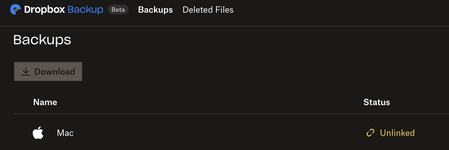
My Mac appears as "Unlinked", syncing icons missing and unable to open files
Anyone experience similar situation?
My Mac is suddenly disconnected from dropbox and on the website it shows "Unlinked".
All my files are missing icons and I cannot open files eit...

Nancy Dropbox Community Moderator
1 year agoDropbox Community ModeratorSorry for jumping in, JoannaM. Can you clarify what you mean when saying this isn’t what you want? Are you seeing your backed up folders now in their default locations perhaps, instead of your local Dropbox folder?
If yes, then this should be expected on the updated Dropbox Backup experience.

JoannaM
1 year agoExplorer | Level 3
Thanks for your reply Nancy, and for the link about the updated Dropbox experience. How can I access my files as I did before (e.g., Mac > Me > Dropbox > Documents/Desktop/Downloads etc.) - I don't want to have to duplicate saving files that are currently saved on my computer on Dropbox, just to be able to access them elsewhere. Is there a workaround? How can I access files from other computers, that currently exist on my computer (and were previously in Dropbox), without going into Browser > Backup?
- Megan1 year ago
Hi JoannaM, what exactly do you see when checking your Backup page online?
Is your Backup enabled, and if so are you able to locate your content there?
Also, any screenshots that you have from your Backup content locally, it's more than welcome.
- JoannaM1 year agoExplorer | Level 3
Hi Megan - yes, the files exist in backup. But I don't want them to only be backed up, I want them to sync between devices, without going through the web browser backup options. This is literally how it was until I updated yesterday. If i can't do that any more, and there are no plans to restore that option, just say so and I'll look for other file sync software.
@sarasheep, sorry for hijacking your post! And thanks for your reply.

About Apps and Installations
Have a question about a Dropbox app or installation? Reach out to the Dropbox Community and get solutions, help, and advice from members.
The Dropbox Community team is active from Monday to Friday. We try to respond to you as soon as we can, usually within 2 hours.
If you need more help you can view your support options (expected response time for an email or ticket is 24 hours), or contact us on X, Facebook or Instagram.
For more info on available support options for your Dropbox plan, see this article.
If you found the answer to your question in this Community thread, please 'like' the post to say thanks and to let us know it was useful!


