Your workflow is unique 👨💻 - tell us how you use Dropbox here.
Forum Discussion

Cerebro
4 years agoHelpful | Level 6
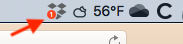
Notification Badge in Menubar Icon - How Do I Make It Go Away?
Hi. I'm running Dropbox v121.4.4267 on Mac OS High Sierra. I don't if something happened with an automatic update. Now, I'm getting something I haven't seen before. I, suddenly, have a red badge ...

JimFuoco
3 years agoExplorer | Level 4
Yes, no problem. Can you pull my email from my account? Or if not, how can I DM you my email address?
 David H.332 years agoExplorer | Level 3
Same here. Please help.
MacOS 12.3, M1.
- Megan2 years ago
Dropbox Community Moderator
Hi David H.33, thanks for posting here today!
I can see that you're currently having the same issue as the OP, with the menu bar icon and our notification badge.
Have you tried all of the troubleshooting steps mentioned throughout this thread?
Let me know more!
- David H.332 years agoExplorer | Level 3
Thanks Megan,
the "switch account" tip did the trick.
Let me add, though, that this is very hidden. Proper UX patten would be: if you get the badge top-level, every subsequent interaction steps should also have one to guide you to the place where the notification actually is.
Thanks
David
- Megan2 years ago
Glad everything is back on track now David H.33!
I'll make sure to forward your thoughts to the appropriate areas so we can continue to improve.
 Groucho2 years agoNew member | Level 2
Sonoma 14.0 -- I have this problem as well -- started as soon as I installed my new Studio M2 Ultra. I would really like to be able to make that badge go away -- it draws my eye and makes me crazy. I do not have any other accounts so I can't switch back and forth as some have done. Thanks
- Groucho2 years agoNew member | Level 2
Never mind -- finally found it -- I had to locate an upsell ad cajoling me to buy a bigger plan and find the no thanks button and now it's gone. Rather irritating but fixed.

About Apps and Installations
Have a question about a Dropbox app or installation? Reach out to the Dropbox Community and get solutions, help, and advice from members.
The Dropbox Community team is active from Monday to Friday. We try to respond to you as soon as we can, usually within 2 hours.
If you need more help you can view your support options (expected response time for an email or ticket is 24 hours), or contact us on X, Facebook or Instagram.
For more info on available support options for your Dropbox plan, see this article.
If you found the answer to your question in this Community thread, please 'like' the post to say thanks and to let us know it was useful!


