Your workflow is unique 👨💻 - tell us how you use Dropbox here.
Forum Discussion

LoveMyslf
7 years agoHelpful | Level 5
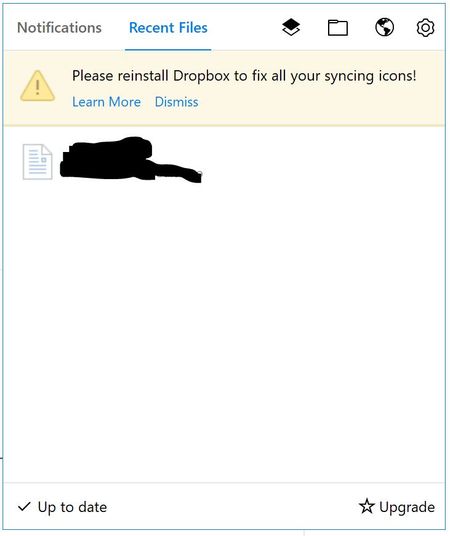
Please reinstall Dropbox to fix all your syncing icons!
This has been an issue for a while now. It's an issue on both my Windows 10 devices. I have tried different solutions from this forum, without luck. I'm running version 50.4.71, from the offline inst...
 7 years ago
Hey, I'm good now! The problem was the ShellIconOverlayIdentifiers as you describe it here: https://help.dropbox.com/syncing-uploads/icon-overlays-not-appearing
I hadn't seen the "dropdown" for Windows when I was first reading that page. Windows must have updated something or whatever Dropbox ended up on rank 16 ...
That's really annoying digging around in the registry. :(
Anyway, they are back.

Jane Dropbox Staff
7 years agoDropbox StaffAs an additional step, my suggestion would be to wipe all previous permissions & start afresh following the steps outlined here, in order to wipe any traces that may be obstructing the Updater.
If the issue persists, please do let me know here, so as to check back on your account details in more detail. Thanks again for all your cooperation!

LoveMyslf
7 years agoHelpful | Level 5
I unlinked and quit Dropbox, I uninstalled, restarted my pc, deactivated Windows Defender, deleted the folders (as told in the guide you posted), ran the offline installer (not as admin) and used the default install location, but the issue has not been resolved. I still get the same message.
- Jane7 years agoI understand that you’d need some additional assistance on this issue & for that reason I’ve made sure to create a Support Request on our system on your behalf, so as to focus on that based on the info I have on my tools for your account & move forward together.Whenever you find some time, please check your inbox for my email & I’ll make sure to promptly follow-up with you from where we’ve left off here.Thanks again for posting on the Community & I’m wishing you a fruitful week ahead!
- mcfc_4heatons7 years agoExplorer | Level 3
I have the same issue and also issues with stick on starting or indexing... Also soemtimes when oi try to access preferences dropbox carshes and closes:
I have tried unlinking and then setting up again
clean install as admin with offline installer (sevral times I tried)
selctive sync with just one folder and a few files to keep the sync small
Two months now with no sync
- Walter7 years ago
Dropbox Community Moderator
Hey there mcfc_4heatons - sorry to hear about your syncing issue.
As I'd really like to help resolve this, I found your existing ticket on our system and relayed all the details of your problem to the technician that is currently handling it. They'll get back to you via email as soon as they have an update on this matter.
Thanks for your patience and have a lovely weekend!

About Apps and Installations
Have a question about a Dropbox app or installation? Reach out to the Dropbox Community and get solutions, help, and advice from members.
The Dropbox Community team is active from Monday to Friday. We try to respond to you as soon as we can, usually within 2 hours.
If you need more help you can view your support options (expected response time for an email or ticket is 24 hours), or contact us on X, Facebook or Instagram.
For more info on available support options for your Dropbox plan, see this article.
If you found the answer to your question in this Community thread, please 'like' the post to say thanks and to let us know it was useful!


