Need to see if your shared folder is taking up space on your dropbox 👨💻? Find out how to check here.
Forum Discussion

boxquestioner
8 years agoNew member | Level 2
Proprietary daemon and python-gpgme
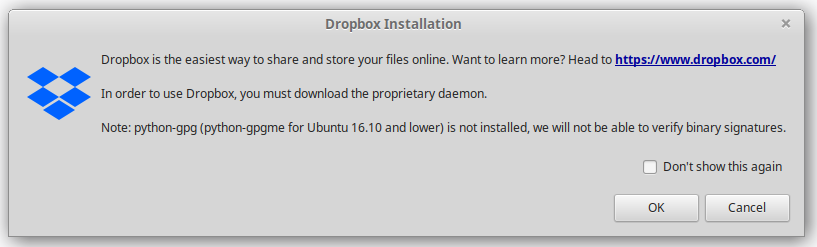
Hi, I try to install Dropbox on Linux. When I clicked on the Dropbox icon or visited www.dropbox.com/download, I got a message:
In order to use Dropbox, you must download the proprietary daemon.
Note: python-gpgme is not installed, we will not be able to verify binary signatures.
What shall I do? How to download the properitary daemon and install python-gpgme?
15 Replies
Replies have been turned off for this discussion
 maihoa7 years agoExplorer | Level 4
Hi
Nearly every time I boot Linux Mint 19.1 (based on Ubuntu 18.04) I get the following dialog message:
python-gpg(python-gpgme for Ubuntu 16-10 and lower) is not installed, we will not be able to verify binary signatures.
Running dpkg -l |grep python-gpg indicates python-gpg is installed
ii python-gpg 1.10.0-1ubuntu2 amd64 Python interface to the GPGME GnuPG encryption library (Python 2)
If I click on OK or Cancel, it doesn't matter which, Dropbox works normally. I get the Dropbox icon, it syncs and as far as I can tell, it's working as it should. However clicking on "Don't show this again" does not work. I still get the message the next time I boot.
How do I get rid of the message? It's annoying.
John
- gcvisel7 years agoHelpful | Level 5
I installed python-gpg and Dropbox loads up without the warning
sudo apt-get install python-gpg
(from Dennnis on Page 1 of this thread. It worked for me too.)
- maihoa7 years agoExplorer | Level 4
I tried purging (sudo apt purge python-gpg) python-gpg then reinstalling. Same problem. I still get the popup. Strange thing about it, about every 5 or 6 boots, I don't get the popup. python-gpg is installed and is the current version in the repository.
dpkg -l | grep python-gpg
ii python-gpg 1.10.0-1ubuntu2 amd64 Python interface to the GPGME GnuPG encryption library (Python 2)John
- Здравко7 years agoLegendary | Level 20
Hi everybody,
That's a Dropbox control script bug, I have signaled about long time ago, but seems nobody take care about, for long time. One other simple workaround is turn off "Start Dropbox on system startup" and start it by hand every time.
Hope this cast some light.
- trdat6 years agoNew member | Level 2
I'm using Ubuntu 18.04 LTS. It works for me!
sudo apt-get install python3-gpg

About Apps and Installations
Have a question about a Dropbox app or installation? Reach out to the Dropbox Community and get solutions, help, and advice from members.
The Dropbox Community team is active from Monday to Friday. We try to respond to you as soon as we can, usually within 2 hours.
If you need more help you can view your support options (expected response time for an email or ticket is 24 hours), or contact us on X, Facebook or Instagram.
For more info on available support options for your Dropbox plan, see this article.
If you found the answer to your question in this Community thread, please 'like' the post to say thanks and to let us know it was useful!


