Your workflow is unique 👨💻 - tell us how you use Dropbox here.
Forum Discussion

Diego5
6 years agoCollaborator | Level 8
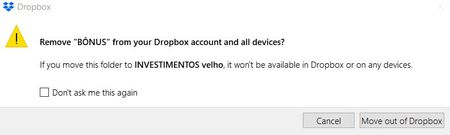
Remove X from your Dropbox account?
Hello, recently I have been receiving warnings that say "Remove X from your Dropbox account and all devices? If you move this folder to X it won’t be available in Dropbox or on any devices." X ...

Daphne Dropbox Community Moderator
6 years agoDropbox Community ModeratorHey Diego5,
I’d suggest that you can go ahead with clicking “don’t ask me again”. Since moving files in this way is an action taken by your computer itself, you shouldn't see files being deleted from your local computer by this action.
The message is just supposed to clarify for the user that moving files outside of the Dropbox folder will result in it being removed from their Dropbox account. I understand the confusion caused by this message and I’ve passed this along to our dev team for review in future improvements.
Hope this helps to clarify the matter a little - Cheers!

TikiJanie
5 years agoExplorer | Level 4
I too am getting the same message, however when I select Dont ask me again it has not worked. I consistently and radomly receive the message in all three of my company files.
It is very frustrating as I fear I may hit the wrong button and lose data.
- Здравко5 years agoLegendary | Level 20
TikiJanie wrote:... I consistently and radomly receive the message in all three of my company files.
...Hi TikiJanie,
What you mean "all three of my company files"? Does it happen only on particular file types and/or such managed with same/similar applications, but not on other file types/applications? Is it happening only during particular activity while you are working with your files (at save moment of changes, for example)?
Hope your clarifications can give better context.
 bluefish5 years agoNew member | Level 2
Checking in. Is this issue still happening for you?
- TikiJanie5 years agoExplorer | Level 4
Good morning,
Yes it is. This only occurs in my Quick Books program in three folders.

About Apps and Installations
Have a question about a Dropbox app or installation? Reach out to the Dropbox Community and get solutions, help, and advice from members.
The Dropbox Community team is active from Monday to Friday. We try to respond to you as soon as we can, usually within 2 hours.
If you need more help you can view your support options (expected response time for an email or ticket is 24 hours), or contact us on X, Facebook or Instagram.
For more info on available support options for your Dropbox plan, see this article.
If you found the answer to your question in this Community thread, please 'like' the post to say thanks and to let us know it was useful!


