Our Community is in read-only mode until April 8th, learn more here. You can still search existing threads or get help via Dropbox Support, the Dropbox Help Center, or Learn.
Forum Discussion

jfreeman
5 months agoNew member | Level 2
Startup error on the Dropbox desktop app
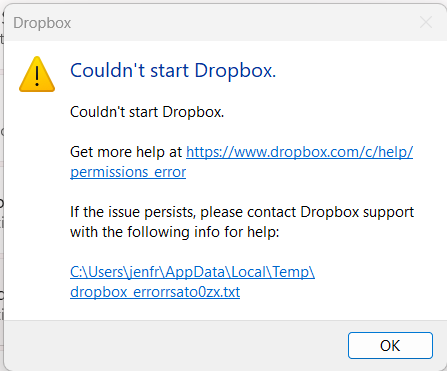
I've been using Dropbox successfully for 10+ years. Last week I started getting an error message - see below. I double checked to see if documents created on my computer are syncing to Dropbox onlin...

Hannah Dropbox Community Moderator
5 months agoDropbox Community ModeratorHey jfreeman, thanks for bringing this to our attention.
Can you please click on the link (.txt file) at the bottom of the error window and send me a copy or a screenshot of that error log, so I can take a closer look?
Thanks in advance!

jfreeman
5 months agoNew member | Level 2
Based on advice from the DropBox Chat help, I uninstalled and reinstalled Dropbox on my computer but it didn't help
- Hannah5 months ago
Thanks for the update, jfreeman.
That error leads me to believe that it does have something to do with your antivirus or some other kind of security program, like perhaps a VPN or firewall?
If you have any of those, can you temporarily disable them, to see if it helps?
- Megan4 months ago
Hey jfreeman!
Following up to confirm whether your issue is resolved or if further support is needed. We're here to help either way.
- CobaBiltoni3 months agoExplorer | Level 3
Ik experience the same, evan after doeing all the steps as mentioned (such as offline install etc..) any new insights in this?
- Hannah3 months ago
Hey CobaBiltoni, sorry to see that you're also having this issue.
Can you send us a screenshot or a copy of the error log as well (from the blue hyperlink on the error), so we can check it out?

About Apps and Installations
Have a question about a Dropbox app or installation? Reach out to the Dropbox Community and get solutions, help, and advice from members.
The Dropbox Community team is active from Monday to Friday. We try to respond to you as soon as we can, usually within 2 hours.
If you need more help you can view your support options (expected response time for an email or ticket is 24 hours), or contact us on X, Facebook or Instagram.
For more info on available support options for your Dropbox plan, see this article.
If you found the answer to your question in this Community thread, please 'like' the post to say thanks and to let us know it was useful!


