Our Community is in read-only mode until April 8th, learn more here. You can still search existing threads or get help via Dropbox Support, the Dropbox Help Center, or Learn.
Forum Discussion

jfreeman
5 months agoNew member | Level 2
Startup error on the Dropbox desktop app
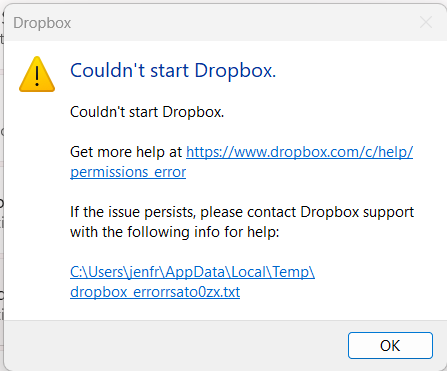
I've been using Dropbox successfully for 10+ years. Last week I started getting an error message - see below. I double checked to see if documents created on my computer are syncing to Dropbox onlin...

CobaBiltoni
3 months agoExplorer | Level 3
Ik experience the same, evan after doeing all the steps as mentioned (such as offline install etc..) any new insights in this?

Hannah Dropbox Community Moderator
3 months agoDropbox Community ModeratorHey CobaBiltoni, sorry to see that you're also having this issue.
Can you send us a screenshot or a copy of the error log as well (from the blue hyperlink on the error), so we can check it out?
- CobaBiltoni3 months agoExplorer | Level 3
Yes i can, your support division i already looking in to it so i am aiming on that expertise as well. But no harm to share it with this forum...
bn.BUILD_KEY: Dropbox bn.VERSION: 237.4.5655 bn.constants.WINDOWS_SHELL_EXT_VERSION: 88 bn.is_frozen: True machine_id: e92964e2-c2c3-401c-a4e8-a0795391c14d pid: 34752 cwd: 'C:\\Windows\\SysWOW64' real_path='C:\\Windows\\SysWOW64' mode=0o40777 uid=0 gid=0 parent mode=0o40777 uid=0 gid=0 HOME: None appdata: 'C:\\Users\\richard\\AppData\\Local\\Dropbox\\instance2' real_path='C:\\Users\\richard\\AppData\\Local\\Dropbox\\instance2' mode=0o40777 uid=0 gid=0 parent mode=0o40777 uid=0 gid=0 dropbox_path: 'D:\\Dropbox' real_path='D:\\Dropbox' mode=0o40777 uid=0 gid=0 parent mode=0o40777 uid=0 gid=0 sys_executable: 'C:\\Program Files (x86)\\Dropbox\\Client\\Dropbox.exe' real_path='C:\\Program Files (x86)\\Dropbox\\Client\\Dropbox.exe' mode=0o100777 uid=0 gid=0 parent mode=0o40777 uid=0 gid=0 trace.__file__: 'C:\\Program Files (x86)\\Dropbox\\Client\\237.4.5655\\python-packages.zip\\dropbox\\client\\ui\\common\\boot_error.pyc' real_path='C:\\Program Files (x86)\\Dropbox\\Client\\237.4.5655\\python-packages.zip\\dropbox\\client\\ui\\common\\boot_error.pyc' not found parent not found TMP: C:\Users\richard\AppData\Local\Temp TEMP: C:\Users\richard\AppData\Local\Temp tempdir: 'C:\\Users\\richard\\AppData\\Local\\Temp' real_path='C:\\Users\\richard\\AppData\\Local\\Temp' mode=0o40777 uid=0 gid=0 parent mode=0o40777 uid=0 gid=0 Traceback (most recent call last): File "desktop/dropbox/client/main.py", line 1113, in wrapper File "desktop/dropbox/client/main.py", line 8760, in finish_dropbox_boot File "desktop/dropbox/client/message_queue.py", line 338, in _wrapped File "desktop/dropbox/client/main.py", line 8040, in _init_components_for_account File "desktop/dropbox/client/main.py", line 7948, in create_sync_engine File "desktop/dropbox/sync_engine_boundary/factory.py", line 237, in make_sync_engine File "desktop/dropbox/sync_engine/nucleus/classic_client/sync_engine.py", line 264, in __init__ File "desktop/dropbox/sync_engine/nucleus/classic_client/modern_client/modern_client.py", line 330, in __init__ File "desktop/dropbox/sync_engine/nucleus/classic_client/modern_client/base.py", line 262, in __init__ File "desktop/dropbox/sync_engine/nucleus/classic_client/thin_adapter/in_proc.py", line 244, in __init__ File "desktop/dropbox/sync_engine/nucleus/classic_client/thin_adapter/in_proc.py", line 622, in _init_new_engine_locked File "desktop/dropbox/sync_engine/nucleus/thin_client/client.py", line 176, in __init__ File "desktop\\extensions\\nucleus\\nucleus_python.pyx", line 81, in nucleus_python.NucleusSyncEngine.__cinit__ nucleus_python.SyncEngineError: "Initializing engine |>> Initializing filesystem |>> Attempting to create old_files |>> Error making tempdir |>> openat_native |>> FSErrorCode::NotADirectory"
- Hannah3 months ago
Thanks for the update, CobaBiltoni!
I just found your ticket and I can see that it's been sent to our specialists, so they'll get back to you with more info on their end as well, the soonest possible.
I forwarded your comments and raised the priority of your ticket and if you need anything else, let us know.
- CobaBiltoni3 months agoExplorer | Level 3
Thanks for that Hannah....fingers crossed... thingsd get complicated without my online backups!
About Apps and Installations
Have a question about a Dropbox app or installation? Reach out to the Dropbox Community and get solutions, help, and advice from members.
The Dropbox Community team is active from Monday to Friday. We try to respond to you as soon as we can, usually within 2 hours.
If you need more help you can view your support options (expected response time for an email or ticket is 24 hours), or contact us on X, Facebook or Instagram.
For more info on available support options for your Dropbox plan, see this article.
If you found the answer to your question in this Community thread, please 'like' the post to say thanks and to let us know it was useful!


