Your workflow is unique 👨💻 - tell us how you use Dropbox here.
Forum Discussion

Mocharuns
3 months agoHelpful | Level 6
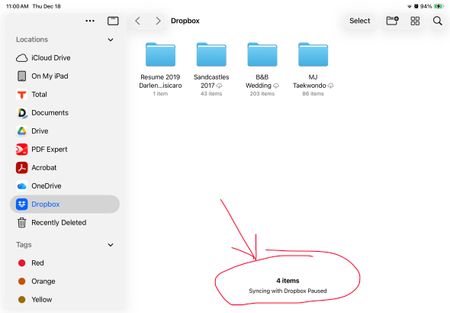
Syncing with Dropbox is paused when I access my Files app.
I have an iPhone 14 and iPad Air 4th generation. When I go to files app, under Dropbox it shows Syncing with Dropbox paused. This is only happening on my iPad works fine on iPhone. Spoke with Apple a...
 3 months ago
Oh boy, I hope this can help others. I just found out what was holding things up and pausing syncing. The latest update from iOS 26.2 has an app called “PREVIEW.” I just updated my iPad to 26.2 and Dropbox was loaded in this “PREVIEW” app. Once I opened the preview app it ended up fixing the sync issue.
Mocharuns
1 month agoHelpful | Level 6
Did you close whatever was in the preview app? As for mine, something was opened in preview and I needed to close it. Also, could a file be opened somewhere else?

ohernandez
1 month agoNew member | Level 2
Nothing was opened in the preview app and it still said that. And also, if I delete the Preview app could that help or does the app need to be on the iPad?
- Mocharuns1 month agoHelpful | Level 6
Yes, you can delete it. If it doesn’t fix anything, then you can reinstall it. I’m not sure what else it could be. I’m sorry. Have you tried calling Apple since it’s an Apple app?
About Apps and Installations
Have a question about a Dropbox app or installation? Reach out to the Dropbox Community and get solutions, help, and advice from members.
The Dropbox Community team is active from Monday to Friday. We try to respond to you as soon as we can, usually within 2 hours.
If you need more help you can view your support options (expected response time for an email or ticket is 24 hours), or contact us on X, Facebook or Instagram.
For more info on available support options for your Dropbox plan, see this article.
If you found the answer to your question in this Community thread, please 'like' the post to say thanks and to let us know it was useful!


