Your workflow is unique 👨💻 - tell us how you use Dropbox here.
Forum Discussion

Henry14
2 years agoExplorer | Level 4
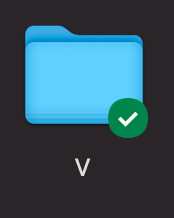
There is a bug with dropbox and google drive, if installed on the same machine
There is a bug with dropbox and google drive, if installed on the same machine (I am using a 2014 15" macbook pro on macOS 11.7.7)
at start up, if google drive loads first (and it always does) ...

Hannah Dropbox Community Moderator
2 years agoDropbox Community ModeratorHey Henry14, thanks for bringing this to our attention.
What's the current sync status and version of the Dropbox app?
You can hover over your Dropbox icon for this info.
Also, does this affect only the sync icons or other Dropbox options as well, like the ones you see when you right-click on a file in the Dropbox folder?
Thanks in advance.
 cancant2 years agoExplorer | Level 4
I, too, have this bug and I, too, came up with a similarly annoying workaround.
Any updates on when this will be fixed?
- Walter2 years ago
Hey there cancant, sorry to hear about this.
Could you please clarify your device's exact OS and the version and status of the desktop app as shown in your menu bar/system tray?
 Sam L.112 years agoExplorer | Level 4
I have this problem as well, running Ventura v13.4.1 and Dropbox v178.4.4811 (with status ="Up to date").
I've had the problem for several years now and I believe it's come up on the forum before.
It seems to be related to Finder extensions -- the Dropbox icons come back as soon as I disable all Google Drive Finder Extensions in the System Settings, even if Google Drive remains open. FWIW, I think this is actually different behavior than I remember from before-- I think I used to have to restart Dropbox.
For me all the icons are gone, not just the green sync icons.
Would definitely be great if this could be fixed.

About Apps and Installations
Have a question about a Dropbox app or installation? Reach out to the Dropbox Community and get solutions, help, and advice from members.
The Dropbox Community team is active from Monday to Friday. We try to respond to you as soon as we can, usually within 2 hours.
If you need more help you can view your support options (expected response time for an email or ticket is 24 hours), or contact us on X, Facebook or Instagram.
For more info on available support options for your Dropbox plan, see this article.
If you found the answer to your question in this Community thread, please 'like' the post to say thanks and to let us know it was useful!


