We’re Still Here to Help (Even Over the Holidays!) - find out more here.
Forum Discussion

Redderz
3 years agoNew member | Level 2
"There was a problem completing this request" on my Windows device when I try to log in.
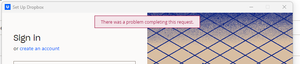
I have recently changed laptop so am trying to add Dropbox to my desktop as before. Every time I log in I get the error "there was a problem completing this request":
I have changed my emai...
- 3 years ago
Hi jannegue, let's jump right into this!
In regards to your account access in the app, we'd need to check your security page online, to see how many active devices you have there.
If you're on a Basic plan, with more than 3 devices connected already, this might be the issue.
As for the browser, can you try to clear your cache there, or use an incognito mode, and see if you can access your account and put the security code that way?
Keep me posted!


Hannah Dropbox Community Moderator
3 years agoDropbox Community ModeratorHey Redderz, thanks for bringing this to our attention.
Can you try to login to this account online through a different browser or private browsing window, to see if you're getting any errors there?
If you can access it online as normal, can you temporarily disable any antivirus, firewall, VPN, or other security app you might be running, to see if that helps at all?
Let me know what you find.
 Redderz3 years agoNew member | Level 2
Hey Hannah,
Thanks for the help. I tried logging on in a different browser and had this error:
So I've been in to my account, turned off the two-step verification and it's worked - thank you! Not sure if that's a bug in the Dropbox system or not? Many thanks for your help
Luke
- Nancy3 years ago
Hi Redderz! I hope you don’t mind me jumping in.
If you’d like to re-enable two-step verification on your Dropbox account, and you still have this issue, I can open a ticket for you, so that we can investigate this further.
Don’t hesitate to ping me, if you'd like that.
 hans_de_vos3 years agoNew member | Level 2
Thanks Hannah, I had today similar problem.... Dropbox I haven't used since 2020 (was for interaction with a customer, and I was made redundant...) back then I had it on a Windows workstation. I now wanted to install it on my Mac and Windows 365 Laptop and ran every time in above Error message. Following your advise I have installed Firefox and now I could install the dropbox app. I then saw that there were 2 Windows machines with subscription to my account (My"old company" PC's) after deleting these machines I was able to install it on my other device as well.
So installing a new browser, and then running the Dropbox installation again on this browser worked well for me.

About Apps and Installations
Have a question about a Dropbox app or installation? Reach out to the Dropbox Community and get solutions, help, and advice from members.
The Dropbox Community team is active from Monday to Friday. We try to respond to you as soon as we can, usually within 2 hours.
If you need more help you can view your support options (expected response time for an email or ticket is 24 hours), or contact us on X, Facebook or Instagram.
For more info on available support options for your Dropbox plan, see this article.
If you found the answer to your question in this Community thread, please 'like' the post to say thanks and to let us know it was useful!


