Your workflow is unique 👨💻 - tell us how you use Dropbox here.
Forum Discussion

redman5087
3 years agoHelpful | Level 6
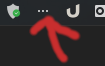
Ubuntu 22.04 Dropbox Trayicon changes to 3 dots
Ubuntu 22.04 clean install... At start the dropbox trayicon is displaying correctly. After a lockscreen and returning to the desktop the trayicon changes to 3 dots. from the terminal: d...
 3 years ago
Maybe I need todo more testing but it seems with the latest version of
"appindicator and KStatusNotifierItem support" extension, it fixes the problem.
Reverting back to "ubuntu Appindicators" extension and the problems is back there.So disable ubuntu appindicators and install the following extension
https://extensions.gnome.org/extension/615/appindicator-support/

Walter Dropbox Community Moderator
3 years agoDropbox Community ModeratorHey redman5087, sorry to jump in, but I just wanted to mention that there's a more recent version of the desktop app which just came out.
Could you give it a go from this page and let us know how it goes?
redman5087
3 years agoHelpful | Level 6
Dropbox version 157.4.4801 does NOT fix the problem...
Thanks anyway for both of you trying to help.
Hope this gets fixed soon
- Jay3 years ago
Hi redman5087, could you try reinstalling the Dropbox desktop application to see if this helps?
- redman50873 years agoHelpful | Level 6
Reinstalling the dropbox application didn't helped.
Same problem.Several users are complaining about this...
More info:
https://askubuntu.com/questions/1407189/ubuntu-22-04-lts-dropbox-icon-systray
Already a bug tracking:
https://bugs.launchpad.net/ubuntu/+source/nautilus-dropbox/+bug/1971558- redman50873 years agoHelpful | Level 6
Any news on the problem?

About Apps and Installations
Have a question about a Dropbox app or installation? Reach out to the Dropbox Community and get solutions, help, and advice from members.
The Dropbox Community team is active from Monday to Friday. We try to respond to you as soon as we can, usually within 2 hours.
If you need more help you can view your support options (expected response time for an email or ticket is 24 hours), or contact us on X, Facebook or Instagram.
For more info on available support options for your Dropbox plan, see this article.
If you found the answer to your question in this Community thread, please 'like' the post to say thanks and to let us know it was useful!


