Your workflow is unique 👨💻 - tell us how you use Dropbox here.
Forum Discussion

redman5087
3 years agoHelpful | Level 6
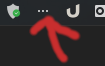
Ubuntu 22.04 Dropbox Trayicon changes to 3 dots
Ubuntu 22.04 clean install... At start the dropbox trayicon is displaying correctly. After a lockscreen and returning to the desktop the trayicon changes to 3 dots. from the terminal: d...
 3 years ago
Maybe I need todo more testing but it seems with the latest version of
"appindicator and KStatusNotifierItem support" extension, it fixes the problem.
Reverting back to "ubuntu Appindicators" extension and the problems is back there.So disable ubuntu appindicators and install the following extension
https://extensions.gnome.org/extension/615/appindicator-support/

Walter Dropbox Community Moderator
3 years agoDropbox Community ModeratorHi redman5087, thanks for the nudge on this!
Can you try uninstalling the version from Ubuntu software center and install the deb from our website instead?
Let us know if this helps!
redman5087
3 years agoHelpful | Level 6
Hi Walter , I never installed it from the ubuntu repository or software center
I downloaded the deb always from the dropbox website....
- redman50873 years agoHelpful | Level 6
Another thing,
When the computer wakes up from lockscreen:
This message appears in the gnome-logs:unable to update icon for dropbox-client-XXXX - redman50873 years agoHelpful | Level 6
Maybe I need todo more testing but it seems with the latest version of
"appindicator and KStatusNotifierItem support" extension, it fixes the problem.
Reverting back to "ubuntu Appindicators" extension and the problems is back there.So disable ubuntu appindicators and install the following extension
https://extensions.gnome.org/extension/615/appindicator-support/
About Apps and Installations
Have a question about a Dropbox app or installation? Reach out to the Dropbox Community and get solutions, help, and advice from members.
The Dropbox Community team is active from Monday to Friday. We try to respond to you as soon as we can, usually within 2 hours.
If you need more help you can view your support options (expected response time for an email or ticket is 24 hours), or contact us on X, Facebook or Instagram.
For more info on available support options for your Dropbox plan, see this article.
If you found the answer to your question in this Community thread, please 'like' the post to say thanks and to let us know it was useful!


