Your workflow is unique 👨💻 - tell us how you use Dropbox here.
Forum Discussion

beaniew
1 year agoHelpful | Level 5
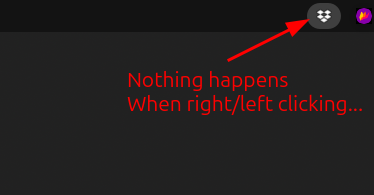
Ubuntu 23.10 - No menu
Ubuntu there's no menu for Dropbox, when I right click the App indicator in the top bar (see image) › dropbox version Dropbox daemon version: 195.4.4995 Dropbox command-line interface...
 1 year ago


FeRDNYC
1 year agoHelpful | Level 6
FeRDNYC wrote:For anyone who wants to have their systemd user session manage the daemon, instead of relying on autostart, you can delete the autostart file and create a dropbox.service file instead.
Actually, instead of just deleting the autostart file, you should switch off "Start Dropbox on system startup" in the Dropbox preferences. That'll delete the autostart file for you, and won't re-create it later when it notices it's missing.

notredruide
1 year agoHelpful | Level 5
Thank you FeRDNYC, you have gone to a lot of trouble! Unfortunately I'm not well enough versed in under-the-hood Linux to adopt that method. I can live with restarting the extension for now. But I may try commenting out that Autostart-Delay line -- that's within my (limited) competence.
About Apps and Installations
Have a question about a Dropbox app or installation? Reach out to the Dropbox Community and get solutions, help, and advice from members.
The Dropbox Community team is active from Monday to Friday. We try to respond to you as soon as we can, usually within 2 hours.
If you need more help you can view your support options (expected response time for an email or ticket is 24 hours), or contact us on X, Facebook or Instagram.
For more info on available support options for your Dropbox plan, see this article.
If you found the answer to your question in this Community thread, please 'like' the post to say thanks and to let us know it was useful!


