Your workflow is unique 👨💻 - tell us how you use Dropbox here.
Forum Discussion

Unic0
8 years agoExplorer | Level 3
Unable to access preference menu on linux
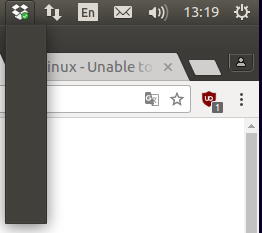
Hello, I just wanted to move the Dropbox folder location through the preference menu but I just can't access the any menu at all. See below : What should I do ? Regards, U
 7 years ago
I found how to fix it. I'm on xubuntu 18.04. There is a new indicator plugin that you have to ask for the task bar. With the new indicator plugin, the dropbox icon works, but not with the default indicator plugin.
willows
7 years agoNew member | Level 2
Same problem here. I cant use dropbox on my linux!!!! Fix the bug plz.

Jane Dropbox Staff
7 years agoDropbox StaffSorry to hear that you can’t access the Preferences menu willows. Can you let me know of your current configuration? Also, have you tried following the steps I’ve posted to Unico in the first page of this thread, in order to re-install the Dropbox application anew?
Please do let me know of the results you get & your findings & I’ll do my best to further advise you in the matter. Thanks in advance!
- maximecb7 years agoNew member | Level 2
Same problem here on Ubuntu 18.04 LTS. There is definitely something wrong with the plugin. Please fix it.
- Jane7 years ago
Hey maximecb, would you mind sharing some more details with us here in regards to your configuration & the troubleshooting steps you’ve followed so far, in order to make sure I’m following-up with you on the right thing? Thanks in advance!
- maximecb7 years agoNew member | Level 2
I found how to fix it. I'm on xubuntu 18.04. There is a new indicator plugin that you have to ask for the task bar. With the new indicator plugin, the dropbox icon works, but not with the default indicator plugin.
About Apps and Installations
Have a question about a Dropbox app or installation? Reach out to the Dropbox Community and get solutions, help, and advice from members.
The Dropbox Community team is active from Monday to Friday. We try to respond to you as soon as we can, usually within 2 hours.
If you need more help you can view your support options (expected response time for an email or ticket is 24 hours), or contact us on X, Facebook or Instagram.
For more info on available support options for your Dropbox plan, see this article.
If you found the answer to your question in this Community thread, please 'like' the post to say thanks and to let us know it was useful!


