Your workflow is unique 👨💻 - tell us how you use Dropbox here.
Forum Discussion

Unic0
8 years agoExplorer | Level 3
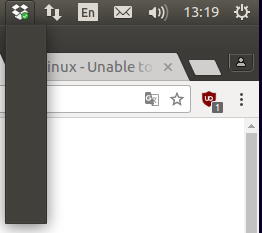
Unable to access preference menu on linux
Hello, I just wanted to move the Dropbox folder location through the preference menu but I just can't access the any menu at all. See below : What should I do ? Regards, U
 7 years ago
I found how to fix it. I'm on xubuntu 18.04. There is a new indicator plugin that you have to ask for the task bar. With the new indicator plugin, the dropbox icon works, but not with the default indicator plugin.
carlo_navarro
6 years agoExplorer | Level 4
Hello,
I stumbled across this because of issues running dropbox on elementary os.
I did the recommendation above to run the headless version of dropbox - and it looks like it installed!
My question now tho is how do I access the preferences with this installation. I would like to change the folder in which Dropbox syncs. (change from the default /home/Dropbox)
Cheers,

Jane Dropbox Staff
6 years agoDropbox StaffHey carlo_navarro, please accept my apologies for the slight delay in getting back in touch with you. Following your last inquiry, it would be worth noting that it’s not currently possible to move the Dropbox folder contents to a different directory using the command line, however I’ve made sure to include your interest along to the appropriate engineering team to inform future changes.
Thanks for checking in with us on our Community & I’m always here if you have more questions or thoughts; let me know in your next message & I’ll do my best to check back with you!
- carlo_navarro6 years agoExplorer | Level 4Hello Jane,
Thanks for the reply.
I ended up moving the files to the default location. I couldn't get the normal installation to work (with the widget on the task bar) with Elementary OS. But the files seems to be syncing, so I guess that'll work for now.
Thanks again,
Carlo - Jane6 years agoAll’s well that ends well carlo_navarro; happy to hear that you managed to fix that on your end :white_check_mark: & thanks a lot for pinging me back with this update! Don’t hesitate to get back in touch again in case you have more questions & take care until we talk again! 😊
About Apps and Installations
Have a question about a Dropbox app or installation? Reach out to the Dropbox Community and get solutions, help, and advice from members.
The Dropbox Community team is active from Monday to Friday. We try to respond to you as soon as we can, usually within 2 hours.
If you need more help you can view your support options (expected response time for an email or ticket is 24 hours), or contact us on X, Facebook or Instagram.
For more info on available support options for your Dropbox plan, see this article.
If you found the answer to your question in this Community thread, please 'like' the post to say thanks and to let us know it was useful!


