Your workflow is unique 👨💻 - tell us how you use Dropbox here.
Forum Discussion

Unic0
8 years agoExplorer | Level 3
Unable to access preference menu on linux
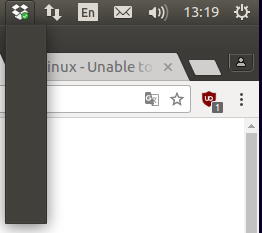
Hello, I just wanted to move the Dropbox folder location through the preference menu but I just can't access the any menu at all. See below : What should I do ? Regards, U
 7 years ago
I found how to fix it. I'm on xubuntu 18.04. There is a new indicator plugin that you have to ask for the task bar. With the new indicator plugin, the dropbox icon works, but not with the default indicator plugin.

Jay Dropbox Community Moderator
5 years agoDropbox Community ModeratorHi chinarut, thanks for joining the Community!
Regarding your query, currently we only official support Ubuntu and Fedora for Linux installations. As per the system requirements, the full desktop app needs the following:
- GNOME shell (may need the TopIcons extension to get the tray icon)
- Unity
- GNOME Classic
- XFCE with the corresponding Nautilus dependencies
If Elementary doesn’t offer these, then it’s possible this is the reason why you’re not seeing the Dropbox icon.
The 'exclude' command should work when running the command line headless installation, along with other functions.
I hope this helps to clarify matters!
chinarut
5 years agoHelpful | Level 6
amazing response @jay!
thank you for pointing us to the exclude command line documentation - it looks very promising on first glance.
If anyone in this thread has experience to share re: the exclude command, love to hear what you've discovered 🙏
thank you for pointing us to the exclude command line documentation - it looks very promising on first glance.
If anyone in this thread has experience to share re: the exclude command, love to hear what you've discovered 🙏
About Apps and Installations
Have a question about a Dropbox app or installation? Reach out to the Dropbox Community and get solutions, help, and advice from members.
The Dropbox Community team is active from Monday to Friday. We try to respond to you as soon as we can, usually within 2 hours.
If you need more help you can view your support options (expected response time for an email or ticket is 24 hours), or contact us on X, Facebook or Instagram.
For more info on available support options for your Dropbox plan, see this article.
If you found the answer to your question in this Community thread, please 'like' the post to say thanks and to let us know it was useful!


