Our Community is in read-only mode until April 8th, learn more here. You can still search existing threads or get help via Dropbox Support, the Dropbox Help Center, or Learn.
Forum Discussion

RamseyM
2 years agoExplorer | Level 4
Unable to update to MacOS on File Provider using macos 14.3.1
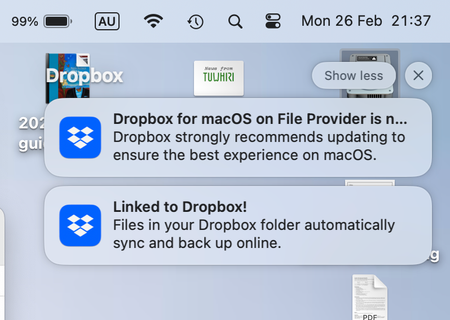
Hello, Whenever I get the message "Dropbox strongly recommends updating to MacOS on File Provider" I go through the motions of doing the update and immediately after reinstalling Dropbox get the ...



Teddy73
1 year agoCollaborator | Level 9
Hi Megan,
No, I do not have any external drives connected.
I do have more than 300,000 files.
Before I did the clean install, this MacBook Air was on File Provider. Where it had over 300,000 files.
Additionally, I have a MacBook Pro which has the notification that it can be upgraded to File Provider (I just have not done it yet as I want the MacBook Air to be on File Provider first as I plan to do a clean install of my MacBook Pro soon).
Many thanks,
Teddy

Megan Dropbox Community Moderator
1 year agoDropbox Community ModeratorThanks for the update, Teddy73.
Can you also confirm that Dropbox has full disk access? Is that already done?
- Teddy731 year agoCollaborator | Level 9
Hi Megan,
I just turned on full disk access, prior to this, it was not switched on.
Accessibility is also switched on.
Please advise me of the next steps I should take.
Teddy
- Megan1 year ago
Hey Teddy73, have you also tried to opt into the beta by signing up for Dropbox early releases?
If not, can you give it a go?
- Teddy731 year agoCollaborator | Level 9
Hi Megan,
I have not opted into the beta and I do not wish to, I place a high level of importance on having a stable version of Dropbox.
Surely, I shouldn't have to opt into a beta. Do you have any other suggestions?
Teddy
- Teddy731 year agoCollaborator | Level 9
That would be a good idea.
About Apps and Installations
Have a question about a Dropbox app or installation? Reach out to the Dropbox Community and get solutions, help, and advice from members.
The Dropbox Community team is active from Monday to Friday. We try to respond to you as soon as we can, usually within 2 hours.
If you need more help you can view your support options (expected response time for an email or ticket is 24 hours), or contact us on X, Facebook or Instagram.
For more info on available support options for your Dropbox plan, see this article.
If you found the answer to your question in this Community thread, please 'like' the post to say thanks and to let us know it was useful!


