Your workflow is unique 👨💻 - tell us how you use Dropbox here.
Forum Discussion

bri_guy
2 years agoHelpful | Level 6
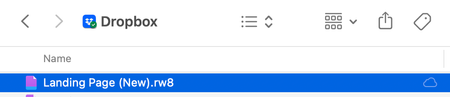
What is this 'cloud only' icon?
I have a file in my Dropbox folder on my Mac that has a "cloud only" icon next to it (see screenshot). What does it mean? It's not one of the icons mentioned at https://help.dropbox.com/sync/macos-sy...

Jay Dropbox Community Moderator
2 years agoDropbox Community ModeratorHi bri_guy, thanks for bringing this to our attention.
Could you attach a screenshot showing the context menu options you get when right clicking the file?
This will help me to assist further!

bri_guy
2 years agoHelpful | Level 6
- Jay2 years ago
Is this file synced fully, and is it visible on the Dropbox site? Do you have any other files in the same folder with the missing context menu item?
- bri_guy2 years agoHelpful | Level 6
1) The file DOES appear on dropbox.com but is not syncing. Any changes made to the file locally are no longer being synced with the online version.
2) I do have one other file with the same icon/missing context menu. Both files with this issue have the .rw8 extension. These are project files created by RapidWeaver. Note that I have other .rw8 files that are not experiencing this issue.

About Apps and Installations
Have a question about a Dropbox app or installation? Reach out to the Dropbox Community and get solutions, help, and advice from members.
The Dropbox Community team is active from Monday to Friday. We try to respond to you as soon as we can, usually within 2 hours.
If you need more help you can view your support options (expected response time for an email or ticket is 24 hours), or contact us on X, Facebook or Instagram.
For more info on available support options for your Dropbox plan, see this article.
If you found the answer to your question in this Community thread, please 'like' the post to say thanks and to let us know it was useful!


