Your workflow is unique 👨💻 - tell us how you use Dropbox here.
Forum Discussion

bri_guy
2 years agoHelpful | Level 6
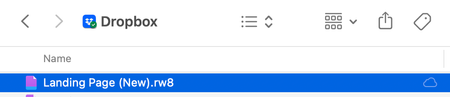
What is this 'cloud only' icon?
I have a file in my Dropbox folder on my Mac that has a "cloud only" icon next to it (see screenshot). What does it mean? It's not one of the icons mentioned at https://help.dropbox.com/sync/macos-sy...

bri_guy
2 years agoHelpful | Level 6
"Logging out of the Dropbox app and then back in, caused the folder path to revert to the old one"
Yeah, that's exactly what happened - and it shouldn't have. But it gets weirder: a while after posting my last reply, I noticed a little red alert badge on the menu bar icon. It said that I needed to update the app, and that doing so would move all of my files to a new location as per Mac OS requirements.
The thing is, this was already done after the last app update. Why was it asking me to update again? Who knows. But I ran through the update and let Dropbox (once again) move everything to ~/Library/CloudStorage. Everything's working now, so that's good.
The weirdest part? The version number of the app is the same after I was told I needed to update. So I "updated" from version 168.4.4802 to 168.4.4802.
I guess the lesson learned here is DO NOT LOG OUT OF THE APP, because it doesn't work properly when you log back in.

Eranjes
2 years agoHelpful | Level 5
bri_guy yeah totally on your side here. It's super unstable and not really transparent what it's doing. I was able to make this setup process a little bit faster:
Workaround I found:
When I first only choose one little file to be synced on startup I will get way faster to moving everything to the new directory. After moving this one small file I can then move on to syncing all the files with selective sync and everything will be set up directly in the new cloud storage. Saved me around 20-30 Hours of waiting.
Solution - How I would expect it to be:
I would expect Dropbox on a blank install directly setting up everything in library/CloudStorage which will save a lot of time and also get around a lot of communicative problems prior to the setup.
Can you check if your version is uploading files from the finder correctly? Thats also not working for me right now.
- bri_guy2 years agoHelpful | Level 6
Eranjes wrote:
Can you check if your version is uploading files from the finder correctly? Thats also not working for me right now.Yes, uploading is working for me. I just created a file, put it in ~/Library/CloudStorage/Dropbox on my Mac and confirmed that it's visible at dropbox.com.
About Apps and Installations
Have a question about a Dropbox app or installation? Reach out to the Dropbox Community and get solutions, help, and advice from members.
The Dropbox Community team is active from Monday to Friday. We try to respond to you as soon as we can, usually within 2 hours.
If you need more help you can view your support options (expected response time for an email or ticket is 24 hours), or contact us on X, Facebook or Instagram.
For more info on available support options for your Dropbox plan, see this article.
If you found the answer to your question in this Community thread, please 'like' the post to say thanks and to let us know it was useful!


