Our Community is in read-only mode until April 8th, learn more here. You can still search existing threads or get help via Dropbox Support, the Dropbox Help Center, or Learn.
Forum Discussion

Flame Soulis
1 year agoHelpful | Level 6
Where's the Linux preferences GUI? The CLI doesn't work.
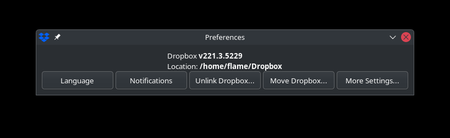
The title says it all. While setting up a fresh laptop with EndeavourOS, I was able to load the UI from an older installation for a moment until it closed itself. This usually happens when the app is...

RyanFromDropbox Dropbox Product Manager
1 year agoDropbox Product ManagerHi Flame Soulis,
I'm on the Product team at Dropbox -- thank you for reaching out!
We're in the process of rolling out changes to our Linux application, which include simplifying portions of the interface and migrating certain preference options (e.g., Selective Sync) over to a CLI-only interaction.
Right now, this is only rolled out to Beta users; and it looks like you're currently on a Beta build, which explains the recent change in your UI.
Given this change, I want to help troubleshoot the CLI issue you're having -- and make sure it's working as expected.
It looks like the dropbox command on your system might not be pointing to the expected Dropbox CLI tool at /usr/bin/dropbox. That could explain the behavior you're seeing.
Can you please try running the CLI directly like this: /usr/bin/dropbox help?
That should give you the correct help output -- let me know if that works!
Cheers,
Ryan

hsiktas
11 months agoHelpful | Level 6
For me, having a solid native Linux client is one of the main reasons I use Dropbox over alternatives from Google and Microsoft.
The Linux client has always felt like an afterthought compared to the more feature-rich Windows and Mac versions, but that was acceptable because it still resembled the cleaner, more focused Dropbox experience from around 2010.
This new (still beta) change feels like you're degrading the Linux experience to little more than a headless CLI version, with only a minimal tray icon left as the sole GUI layer. At that point, there’s barely any distinction from cloud-agnostic CLI tools like `rclone`, and I seriously doubt you’ll retain many users after a downgrade like this.
The biggest UX downgrade, in my opinion, is managing Selective Sync. Commands like `dropbox exclude add foo bar` and `dropbox exclude remove baz qux` are clunky, and the double-negation logic of "exclude remove" is especially unintuitive.
 Flame Soulis11 months agoHelpful | Level 6
This is honestly why I created my forum account to figure this out. The fact this is going to be the next version just... why? It really doesn't make sense to completely degrade the user experience, especially since the whole point of using Dropbox was to get away from doing CLI stuff, and as the family IT person, no one in my household is exactly cheerful about this change.
As much as I could work on writing my own sub-GUI system for managing things, it shouldn't be needed. If I'm not mistaken, DropBox is still using Qt... which works on all platforms, so why can't anyone just compile for that? What sucks more about this change is I'm locked in on an annual subscription, and I JUST had my renewal done last month. As Windows 10's EOL approaches, I've made the switch to Linux in preparation for this, along with all my tools, and Dropbox's downgrade is going to remain in my mind for a while.
About Apps and Installations
Have a question about a Dropbox app or installation? Reach out to the Dropbox Community and get solutions, help, and advice from members.
The Dropbox Community team is active from Monday to Friday. We try to respond to you as soon as we can, usually within 2 hours.
If you need more help you can view your support options (expected response time for an email or ticket is 24 hours), or contact us on X, Facebook or Instagram.
For more info on available support options for your Dropbox plan, see this article.
If you found the answer to your question in this Community thread, please 'like' the post to say thanks and to let us know it was useful!


