Your workflow is unique 👨💻 - tell us how you use Dropbox here.
Forum Discussion

ar1zona1
2 years agoHelpful | Level 5
Why can't I backup up any folder with Dropbox Backup?
We recently upgraded to Dropbox business and I am trying to give guidance to our team members for using dropbox backup to backup key folders from their computers.
I cannot seem to figure this out. ...
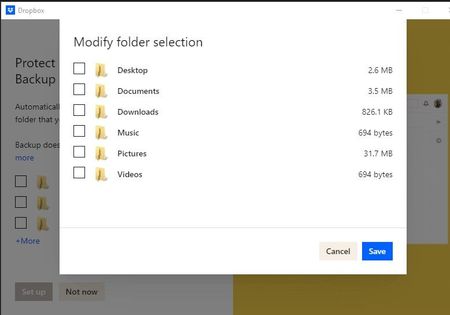
- 2 years ago
The Backup beta is currently only available to personal accounts, and not for Dropbox Business teams, which is why you might not be seeing this option.


BigRev
2 years agoNew member | Level 2
Nancy
Im a new user to Backup Beta literally this week and really like the concept as a personal account user. It would be great to see access in the future to all the browser favorites folders in whatever internet browsers you have installed like chrome or Edge etc. Documents, Download, pictures, videos, music etc are all great and catch 95% of the likely data a personal user would have - BUT if you have your home PC stolen in my experience on top of all that data what you really miss is the all the website links you have amassed over the years when you start with a new PC or Laptop. Also a small message on the backup settings under where you setup daily, weekly etc saying "If your PC or Laptop is turned off at the allocated backup time then it will backup automatically if it has missed that time." or disclaimer that it wont...just be good to know on the settings page in small writing imo. thanks.


About Apps and Installations
Have a question about a Dropbox app or installation? Reach out to the Dropbox Community and get solutions, help, and advice from members.
The Dropbox Community team is active from Monday to Friday. We try to respond to you as soon as we can, usually within 2 hours.
If you need more help you can view your support options (expected response time for an email or ticket is 24 hours), or contact us on X, Facebook or Instagram.
For more info on available support options for your Dropbox plan, see this article.
If you found the answer to your question in this Community thread, please 'like' the post to say thanks and to let us know it was useful!


