Your workflow is unique 👨💻 - tell us how you use Dropbox here.
Forum Discussion

ar1zona1
2 years agoHelpful | Level 5
Why can't I backup up any folder with Dropbox Backup?
We recently upgraded to Dropbox business and I am trying to give guidance to our team members for using dropbox backup to backup key folders from their computers.
I cannot seem to figure this out. ...
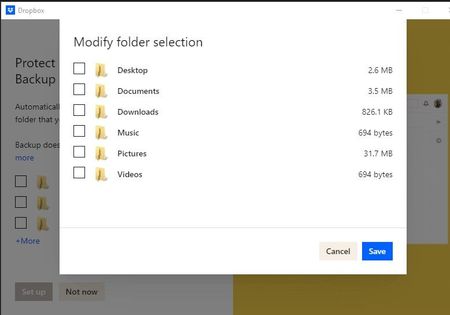
- 2 years ago
The Backup beta is currently only available to personal accounts, and not for Dropbox Business teams, which is why you might not be seeing this option.


lazyfrog
2 years agoExplorer | Level 3
Hey Nancy and the Dropbox Team,
on your page about dropbox backup it says in german:
Hinweis: Wenn Sie die Betaversion von Dropbox Backup verwenden, können Sie auf „Ordnerauswahl ändern“ klicken, um Ordner von Ihrem Gerät hinzuzufügen, die noch nicht aufgeführt sind.
However, I cant find this option to " change folder selection", and I cant add a folder that is not yet listed. I can expand the slection which then shows me all the folders from my own windows user folder, yet just like many others on this forum I keep my main data and media in the C:\ folder and would be really happy if you had the feature to select those to be backed up.
Please let me know, what the hint actually refers to, just the folders in the user folder, or any folder on my PC. If its not the second please give this request to the development team :).
Thanks
PS: https://help.dropbox.com/de-de/organize/how-to-use-dropbox-backup this is the link where the hint is on

Hannah Dropbox Community Moderator
2 years agoDropbox Community ModeratorHey lazyfrog, thanks for chiming in!
While the Dropbox Backup Beta allows you to back more folders up to Dropbox, you still can only choose from folders in your home folder, so if the Dropbox application is installed on the C: drive, you can only back up folders from there.
I hope this clarifies things and I will of course pass your feedback along to our team about this.
Thanks!
About Apps and Installations
Have a question about a Dropbox app or installation? Reach out to the Dropbox Community and get solutions, help, and advice from members.
The Dropbox Community team is active from Monday to Friday. We try to respond to you as soon as we can, usually within 2 hours.
If you need more help you can view your support options (expected response time for an email or ticket is 24 hours), or contact us on X, Facebook or Instagram.
For more info on available support options for your Dropbox plan, see this article.
If you found the answer to your question in this Community thread, please 'like' the post to say thanks and to let us know it was useful!


