Our Community is in read-only mode until April 8th, learn more here. You can still search existing threads or get help via Dropbox Support, the Dropbox Help Center, or Learn.
Forum Discussion

Photo O.
5 months agoCollaborator | Level 10
Wrong status icons showing on subfolders set to online only on Windows
Device
HP Elite 8200 Operating System/Browser (if using the web)
WIndows 10 Pro v22H2 ESO Dropbox App Version (if using the app)
(234.4.5905)
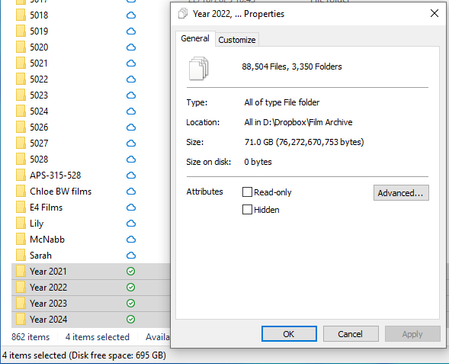
See attachment
The four subfold...

Jay Dropbox Community Moderator
5 months agoDropbox Community ModeratorHi Photo O., thanks for messaging the Community.
Could you check if you have any hidden files or folders in these folders with zero byte files in them?
Would it be possible to get clarification on what you mean by other users adding content from connected workstations? Are there shared folders within the folders you indicated?
Have you tried marking one of the 'Year' folders as available offline, and once completed, mark it again as online-only to see if this helps?
Keep me updated with any progress!

Photo O.
4 months agoCollaborator | Level 10
Hi
Thank you for getting back to me
- Hidden files or folders... I have checked for hidden files and system files. I did find some "Thumbs.db" files, which I deleted. Also found a couple of "desktop.ini" files which I also deleted. Not sure how to go about searching for folders or files according to their file sizes. I will get back to you about this.
- Other users adding content... We have other work stations, all linked to the same Dropbox account. People doing work at those workstations also send folders to the Film Archive.
- Marking Year folders... Trying that now. It will take a long time to finish downloading and uploading, so I will get back to you about that.
Worth noting:
- I was wrong about the Parent Folder, "Film Archive" showing the correct status icon. It actually shows the wrong icon... same one as the year subfolders.
- All the other workstations show the wrong icons as well, which to me indicates that whatever is causing the problem is being uploaded to Dropbox, and not something living on the computer that is not being uploaded.

About Apps and Installations
Have a question about a Dropbox app or installation? Reach out to the Dropbox Community and get solutions, help, and advice from members.
The Dropbox Community team is active from Monday to Friday. We try to respond to you as soon as we can, usually within 2 hours.
If you need more help you can view your support options (expected response time for an email or ticket is 24 hours), or contact us on X, Facebook or Instagram.
For more info on available support options for your Dropbox plan, see this article.
If you found the answer to your question in this Community thread, please 'like' the post to say thanks and to let us know it was useful!


