Our Community is in read-only mode until April 8th, learn more here. You can still search existing threads or get help via Dropbox Support, the Dropbox Help Center, or Learn.
Forum Discussion

Photo O.
5 months agoCollaborator | Level 10
Wrong status icons showing on subfolders set to online only on Windows
Device
HP Elite 8200 Operating System/Browser (if using the web)
WIndows 10 Pro v22H2 ESO Dropbox App Version (if using the app)
(234.4.5905)
See attachment
The four subfold...
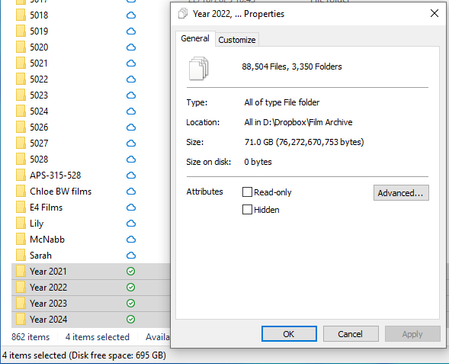

Photo O.
4 months agoCollaborator | Level 10
OK, so I have found the problem. It seems there is a hard limit on the number of subfolders allowed in any parent folder.
As a test, I created a new folder called Yr 2021 set it to online only, and started copying folders, a few at a time from Year 2021 to Yr 2021. Everything was going well at first, then suddenly, the icon on Yr 2021 changed to the green "Available on this device" icon. I tried looking through the last few folders I copied, but could not see anything out of place there. So I started transferring them back, and after a few copies, the icon swapped back to the correct one. I tried just adding "New folder" subfolders, and as soon as I hit 250, the icon switched to the wrong one. It seems the hard limit is 249 subfolders. Anything over that and the wrong icon is displayed.
First I tried putting three subfolders inside Year 2021 and transferred about 200 folders into each subfolder. That didn't work, so I renamed Year 2021 to Year 2021-1, and created three new folders, Year 2021-2, Year 2021-3 and Year 2021-4. I then distributed all the folders (about 700 altogether among those three folders. That worked, and all four folders showed the correct icon. Of course, the Parent folder "Film Archive" shows the wrong icon, because it contains a lot more subfolders.
A hard limit on subfolders is probably not a good idea and needs addressing. Windows has no limit on the number of subfolders in a parent folder (nor does MacOS) and nor should Dropbox.
What I have done is a workaround - an end-run around the problem. It is not a solution, and should not be regarded as such. It is something that needs addressing.
About Apps and Installations
Have a question about a Dropbox app or installation? Reach out to the Dropbox Community and get solutions, help, and advice from members.
The Dropbox Community team is active from Monday to Friday. We try to respond to you as soon as we can, usually within 2 hours.
If you need more help you can view your support options (expected response time for an email or ticket is 24 hours), or contact us on X, Facebook or Instagram.
For more info on available support options for your Dropbox plan, see this article.
If you found the answer to your question in this Community thread, please 'like' the post to say thanks and to let us know it was useful!


