Our Community is in read-only mode until April 8th, learn more here. You can still search existing threads or get help via Dropbox Support, the Dropbox Help Center, or Learn.
Forum Discussion

dbloomfield1
5 years agoExplorer | Level 3
additional permissions are required to access files BigSur
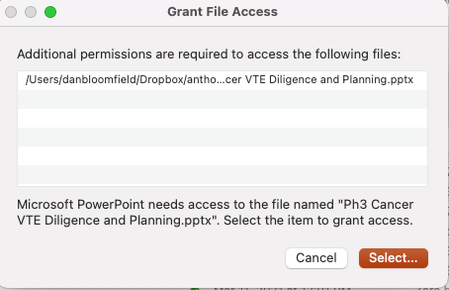
When I installed BigSur, dropbox hasn't been functioning normally. I sync a number of folders from my Dropbox filesystem, but when I try to open them I get the following message: "additional permiss...
- 5 years agoHello there dbloomfield1, I hope you're having a good day!
If you haven't already, can you restart your computer to see if that does the trick?
If you're still getting the errors after a restart, can you let me know which version of the app you have installed, and the current sync status?
Let me know how it goes!

Daphne Dropbox Community Moderator
5 years agoDropbox Community ModeratorHello there dbloomfield1, I hope you're having a good day!
If you haven't already, can you restart your computer to see if that does the trick?
If you're still getting the errors after a restart, can you let me know which version of the app you have installed, and the current sync status?
Let me know how it goes!
If you haven't already, can you restart your computer to see if that does the trick?
If you're still getting the errors after a restart, can you let me know which version of the app you have installed, and the current sync status?
Let me know how it goes!
 dbloomfield15 years agoExplorer | Level 3
Thanks Daphne. When I restarted my computer the OS upgraded as did some other programs. Now it seems to work fine - I haven't gotten that error message since doing that. Many thanks.
- Daphne5 years agoGlad to hear that helped dbloomfield1!
If the issue does crop up again, don't hesitate to give me a nudge here. 😀
I hope you have a great rest of your week! Davide Bilardi4 years agoExplorer | Level 3
I'm using my dropbox on multiple devices and very often I have the message "additional permissions are required to access the following file". I've seen that the solution suggested is to restart the computer.
This is not a real solution since when I'm working on a lot of files and I'm in between doing other things I can not restart the computer. And this is happening several times a day.
Sorry, do you have an alternative solution so that I can access my files from my multiple devices (and have them synchronized) without having to restart them?
Thanks!
About Integrations
Get help with third-party integrations from the Dropbox Community.
The Dropbox Community team is active from Monday to Friday. We try to respond to you as soon as we can, usually within 2 hours.
If you need more help you can view your support options (expected response time for an email or ticket is 24 hours), or contact us on X, Facebook or Instagram.
For more info on available support options for your Dropbox plan, see this article.
If you found the answer to your question in this Community thread, please 'like' the post to say thanks and to let us know it was useful!


