Your workflow is unique 👨💻 - tell us how you use Dropbox here.
Forum Discussion

Glenn001
6 years agoNew member | Level 2
AppleTV DropboxApp not Displaying Pictures
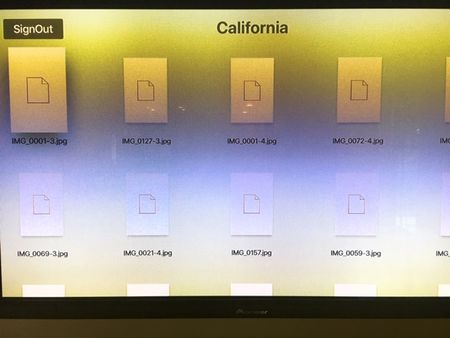
I have installed the AppleTV app and synched it up my desktop account using the Activation Code. I get a message indicating that I have successfully activated. The TV screen then displays the photo ...
- 6 years ago
Thanks for the additional information Glenn - most appreciated!
Did you restart your computer as well by any chance?
If your desktop app is indeed showing 'Up to date', I won't be able to help further I'm afraid.
At this point, it would be better to reach out to the developers of the app you use to connect or mirror your Dropbox Folder to your Apple TV and ask for their direct assistance.
Let me know what you find!

Walter Dropbox Community Moderator
6 years agoDropbox Community ModeratorHey there Glenn001 - sorry to hear about this.
To be honest, I'm not really familiar with the setup you're using. Could you provide some additional information about your current configuration?
Merely to exclude possible factors that could be causing this now, could you clarify if the desktop app on your computer is up and running at the moment? If so, is it 'Up to date' or still syncing?
Have you tried restarting your device(s) and reconnecting them in an attempt to troubleshoot this visual discrepancy?
Any additional information will be much appreciated!
Glenn001
6 years agoNew member | Level 2
Hi Walter - Thanks for the quick response. I am running Windows 10 on my laptop Ver.1803. My Apple Unit is the latest version. My TV is set to 1080P.
My Desktop App is up to date. I rebooted my AppleTV box and I'm still getting the same result. Glenn
- Walter6 years ago
Thanks for the additional information Glenn - most appreciated!
Did you restart your computer as well by any chance?
If your desktop app is indeed showing 'Up to date', I won't be able to help further I'm afraid.
At this point, it would be better to reach out to the developers of the app you use to connect or mirror your Dropbox Folder to your Apple TV and ask for their direct assistance.
Let me know what you find!
- misalo6 years agoNew member | Level 2
I am having the same problem. I see my files but the app won't actually OPEN the images or other files - I just get a black screen with a small red icon in the bottom left corner. Very frustrating! I was hoping to be able to view a powerpoint presentation on my large format TV prior to the event.
About Integrations
Get help with third-party integrations from the Dropbox Community.
The Dropbox Community team is active from Monday to Friday. We try to respond to you as soon as we can, usually within 2 hours.
If you need more help you can view your support options (expected response time for an email or ticket is 24 hours), or contact us on X, Facebook or Instagram.
For more info on available support options for your Dropbox plan, see this article.
If you found the answer to your question in this Community thread, please 'like' the post to say thanks and to let us know it was useful!


