We're making some changes to the Dropbox Community 👩💻 - Find out more here.
Forum Discussion

Sam Toor
2 years agoHelpful | Level 6
Auto backup not working on my windows pc
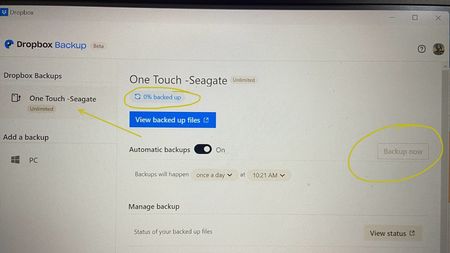
Hi, I just bought a Seagate HDD and I wanted to backup on dropbox. it has unlimited storage offer but when I connect, its stuck on 0%. Its 11am here and the backup should start 10:21am as activated. ...
 2 years ago
Ok so finally it started auto backup yesterday where I did nothing. I think Dropbox takes time to make a pre -backup first. Once it estimated the total storage after more then 24 hours, then it started making the actual backup.
Sam Toor
2 years agoHelpful | Level 6
Did it multiple times. When I connect, it ask to backup and I say yes but it doesnlt start the backup

Hannah Dropbox Community Moderator
2 years agoDropbox Community ModeratorHey Sam Toor, is the Dropbox application syncing files as normal otherwise (apart from the backup of the drive)?
If you hover over the Dropbox icon in your system tray, what do you see?
- Sam Toor2 years agoHelpful | Level 6Yes, I have hover to the hdd.
It says, 0 bytes of 1.01 TB backed up, 0% complete.
It was earlier less then 1Tb before. It seems it’s backing up but why it’s showing 0% complete ? - Hannah2 years ago
Hey Sam, happy Monday!
Is the backup status still the same today?
- Sam Toor2 years agoHelpful | Level 6
Ok so finally it started auto backup yesterday where I did nothing. I think Dropbox takes time to make a pre -backup first. Once it estimated the total storage after more then 24 hours, then it started making the actual backup.
About Integrations
Get help with third-party integrations from the Dropbox Community.
The Dropbox Community team is active from Monday to Friday. We try to respond to you as soon as we can, usually within 2 hours.
If you need more help you can view your support options (expected response time for an email or ticket is 24 hours), or contact us on X, Facebook or Instagram.
For more info on available support options for your Dropbox plan, see this article.
If you found the answer to your question in this Community thread, please 'like' the post to say thanks and to let us know it was useful!


