Our Community is in read-only mode until April 8th, learn more here. You can still search existing threads or get help via Dropbox Support, the Dropbox Help Center, or Learn.
Forum Discussion

yvancg
2 years agoHelpful | Level 5
Can't add dropbox files from my iPad anymore
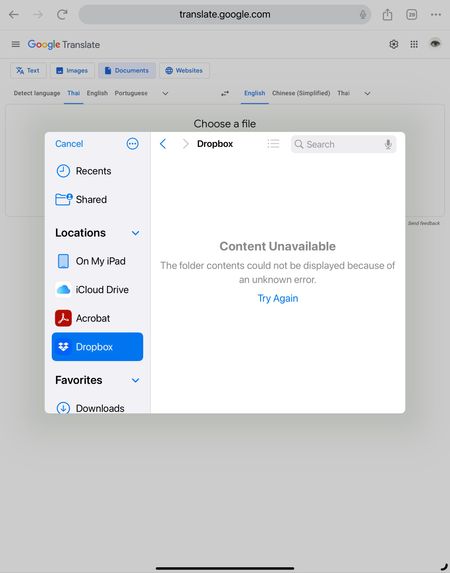
I have been using Dropbox for years and one of the feature I really like is the ability to import files directly from the Dropbox folder (on my iPad). For example, if a website is asking me for a co...
- 2 years ago
Ok so updating to iPasOS 17 seems to have resolved the issue.


Hannah Dropbox Community Moderator
2 years agoDropbox Community ModeratorHey yvancg, thanks for bringing this to our attention.
Is it possible that Dropbox is no longer added to your Files app?
Check out this article on how to add it and let me know if that helps.
Cheers!
- yvancg2 years agoHelpful | Level 5
Thanks for the prompt reply.
As you can see from the screenshot the Dropbox folder appears on the side. It shows the same on the Files app (and same error message).
I haven't made any change on my setup so I believe this is a bug.
I am upgrading to iPadOS 17 as we speak to see if this solves the issues. I am running DB on an iPad Pro M2 2023 if that helps.
- yvancg2 years agoHelpful | Level 5
Ok so updating to iPasOS 17 seems to have resolved the issue.
About Integrations
Get help with third-party integrations from the Dropbox Community.
The Dropbox Community team is active from Monday to Friday. We try to respond to you as soon as we can, usually within 2 hours.
If you need more help you can view your support options (expected response time for an email or ticket is 24 hours), or contact us on X, Facebook or Instagram.
For more info on available support options for your Dropbox plan, see this article.
If you found the answer to your question in this Community thread, please 'like' the post to say thanks and to let us know it was useful!


