Our Community is in read-only mode until April 8th, learn more here. You can still search existing threads or get help via Dropbox Support, the Dropbox Help Center, or Learn.
Forum Discussion

AST2
1 year agoHelpful | Level 6
Connection with Epson Printer just randomly stopped
Hi All,
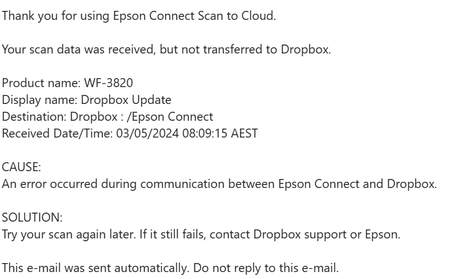
Just out of nowhere when we scan from our epson printers (we have two) it no longer writes to drop box. See error message email below;
I have already carried out the fo...
 1 year ago
It seems that Epson fixed the issue on their end:
- Scan to Cloud disaster recovery notice (Wednesday, May 8th, 2024 11:00 (UTC))
Thank you for using our products regularly.
We apologize for any inconvenience caused to our users.
An issue occurred that made Dropbox unavailable during the following times.- From May 1st, 2024 04:00 to May 8th, 11:00 (UTC)
- Scan to Cloud disaster recovery notice (Wednesday, May 8th, 2024 11:00 (UTC))

Walter Dropbox Community Moderator
1 year agoDropbox Community ModeratorHey AST2 & RW71 - sorry to jump in here, but could you let us know if you've tried disconnecting the Epson's integration from your connected apps tab and re-connecting it anew if it's listed there?
Also, have you tried rebooting your computer, printer and internet router since you first noticed this?

jkl9900
1 year agoNew member | Level 2
I have the same issue as well.
 nrennie1 year agoNew member | Level 2
Same issue here. I have removed the Epson app from the Dropbox page and then restored it from Epson connect, I've edited the Epson Connect destination folder on Dropbox, in EpsonConnect I changed the name "Dropbox" as destination to "Dropbox 2024" and confirmed that this name showed up on my scanner (WF-3620): all of this appeared to work fine, but I still get the error message "Your scan data was received, but not transferred to Dropbox." I've restarted both printer/scanner and computer: no difference.
 wimaru1 year agoNew member | Level 2
Bis zum 18.04.2024 hat alles funktioniert, jetzt habe ich auch das Problem.
About Integrations
Get help with third-party integrations from the Dropbox Community.
The Dropbox Community team is active from Monday to Friday. We try to respond to you as soon as we can, usually within 2 hours.
If you need more help you can view your support options (expected response time for an email or ticket is 24 hours), or contact us on X, Facebook or Instagram.
For more info on available support options for your Dropbox plan, see this article.
If you found the answer to your question in this Community thread, please 'like' the post to say thanks and to let us know it was useful!


