We're making some changes to the Dropbox Community 👩💻 - Find out more here.
Forum Discussion

Gomido
4 years agoHelpful | Level 5
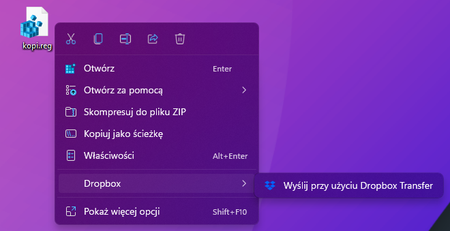
How to remove an transfer option from context menu windows 11
Hi, it has been bothering me for a while that there is a Dropbox option in every menu. I have never used it, I do transfer files to dropbox via a folder - I organize the files right away. I removed ...
 4 years ago
Propably solved. I will let you know in a few days if this sick menu has returned after an update.
In Dropbox v138.4.23.92 just delete the three folders with the name dropbox in the menu in "HKEY_CLASSES_ROOT\PackagedCom\Package" and restart app

Vl4dimir
3 years agoExplorer | Level 4
.... have option to remove context menu entries in dropbox app
this should work after restarting and even after dropbox update
REG ADD "HKEY_LOCAL_MACHINE\SOFTWARE\Microsoft\Windows\CurrentVersion\Shell Extensions\Blocked" /v "{ECD97DE5-3C8F-4ACB-AEEE-CCAB78F7711C}" /t REG_SZ /d "" /f
REG ADD "HKEY_LOCAL_MACHINE\SOFTWARE\Microsoft\Windows\CurrentVersion\Shell Extensions\Blocked" /v "{FBC9D74C-AF55-4309-9FB2-C426E071637F}" /t REG_SZ /d "" /fVl4dimir
3 years agoExplorer | Level 4
hmm that does not work
About Integrations
Get help with third-party integrations from the Dropbox Community.
The Dropbox Community team is active from Monday to Friday. We try to respond to you as soon as we can, usually within 2 hours.
If you need more help you can view your support options (expected response time for an email or ticket is 24 hours), or contact us on X, Facebook or Instagram.
For more info on available support options for your Dropbox plan, see this article.
If you found the answer to your question in this Community thread, please 'like' the post to say thanks and to let us know it was useful!


