We’re Still Here to Help (Even Over the Holidays!) - find out more here.
Forum Discussion

Dmkiz
4 years agoExplorer | Level 4
Integration with iOs Files app dropping out
I am running an iPad Pro (3rd generation) with iOs 15.1, but I had the same problem with previous versions of iOs as well. I have two issues.
First, I have tried a number of times to add Dropbo...

Walter Dropbox Community Moderator
4 years agoDropbox Community ModeratorThanks for the additional details bsullens
As a last thing to try, could you restart your iPad, clear the app's cache and then disable Dropbox as a location within the Files app and re-enabling it anew?
If the issue persists, I'll send you an email to investigate further.

MissPaulette
4 years agoHelpful | Level 6
I am having the exact same problem on my iPhone 11 iOS ver 15.4.1 and have been having it for about a year. I have uninstalled and reinstalled countless times, rebooted often, cleared my cashe often. I’m very frustrated. Please help.
- Hannah4 years ago
Hey MissPaulette, thanks for the nudge here and sorry to see you're having trouble.
Would you mind giving some details about the issue you're having?
Have you also checked this article with info on how to use Dropbox through your Files app to make sure everything's okay on your end?
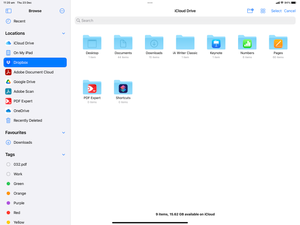
- MissPaulette4 years agoHelpful | Level 6After I login to Dropbox from my iPhone 11 I go to the iOS Files folder and browse to my Dropbox files. A short time after that the Dropbox disconnects and I can’t open any files, I just get the little spinny thing. After 10 minutes or more I can then again browse to my files until it disconnects again. As stated above I have reinstalled the Dropbox app countless times, rebooted over and over again, cleared my cashe again and again (can you tell I’m in It? ☺️).

About Integrations
Find solutions to issues with third-party integrations from the Dropbox Community. Share advice and help members with their integration questions.
The Dropbox Community team is active from Monday to Friday. We try to respond to you as soon as we can, usually within 2 hours.
If you need more help you can view your support options (expected response time for an email or ticket is 24 hours), or contact us on X, Facebook or Instagram.
For more info on available support options for your Dropbox plan, see this article.
If you found the answer to your question in this Community thread, please 'like' the post to say thanks and to let us know it was useful!


