Your workflow is unique 👨💻 - tell us how you use Dropbox here.
Forum Discussion

LRBH
3 years agoExplorer | Level 4
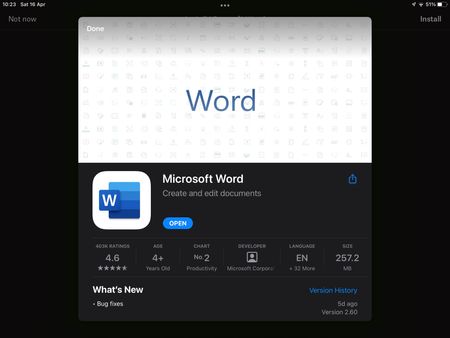
iOS Dropbox app won’t acknowledge Microsoft Word app
I’m on Dropbox version 274.2 and Microsoft Word version 2.60. Today I started having an issue where trying to open a Word doc in my Dropbox app prompts me to install Word, despite the app being insta...

Gazlaz
3 years agoExplorer | Level 4
Everything has worked as it should until recently. Now when I try to open an excel file in My Dropbox on iPhone I get a message saying I need to install excel.
I’ve tried reinstalling both apps (Dropbox and excel) and that resolves the issue until I try again a day later and I get the same issue again.
Anyone else seen a similar issue before?
Thanks
 allenng3 years agoExplorer | Level 4
Hi All,
after update of new IOS on my iPad i can't seems to open up files from Dropbox to Excel.
Dropbox app keep asking me to download the Excel app but i already have it.
Please advise- Elixir3 years agoStar | Level 19
Can you please try installing Microsoft unified Office App https://aka.ms/OfficeAppiOS? Note that now Microsoft has a unified office app (along with individual Word, Excel, PowerPoint, and OneNote apps), which can be used to view/edit all supported office files. Then reinstall the Dropbox app as well.
- allenng3 years agoExplorer | Level 4
Done what you mentioned, but it still ask me to download Excel app.
 Kerry123 years agoExplorer | Level 4Ever since my iPad did an update, I cannot open a word or excel document through dropbox, I can only open it if I go directly to Excel or Word. When I go through Dropbox, it asked me to install Microsoft excel, which I have already done.
Any ideas?- Megan3 years ago
Dropbox Community Moderator
Hi Kerry12, I hope you're doing well!
What is the version of the OS and the Dropbox app installed on the device?
Can you send me a screenshot of the message you see on your end, when trying to preview and open the files, so I can have visual?
Keep me posted!
 Zoltan3 years agoHelpful | Level 5Same problem with both excel and words. They need to fix that quick, can not use Dropbox without those 2
 Jelen3 years agoHelpful | Level 5
I have the same 😕
I've try everything and nothing- Hannah3 years ago
Hey Gazlaz, zoltan and Jelen, thanks for bringing this to our attention.
Are you having this issue only when opening files saved to your Dropbox? How about other MS Office files saved in other places on your device?
If it's just Dropbox, can you try to clear out the Dropbox app's cache, from the option in the app's settings, to see if that helps?
Keep us posted!
- Gazlaz3 years agoExplorer | Level 4Thanks for the reply.
It’s just when opening from Dropbox. I’ve cleared the cashe and still the same issue.
 prsny3 years agoExplorer | Level 4
Same issue here. Moreover, exporting an xlsx file as a pdf to a DB folder results in a file size of 0kb. Obviously the file won't open.
Performing the same on Android works fine.
Client type: iphone OS version: 15.4.1- prsny3 years agoExplorer | Level 4
Also tested with another iphone user on version 14.8.1 and it works fine.


About Integrations
Get help with third-party integrations from the Dropbox Community.
The Dropbox Community team is active from Monday to Friday. We try to respond to you as soon as we can, usually within 2 hours.
If you need more help you can view your support options (expected response time for an email or ticket is 24 hours), or contact us on X, Facebook or Instagram.
For more info on available support options for your Dropbox plan, see this article.
If you found the answer to your question in this Community thread, please 'like' the post to say thanks and to let us know it was useful!


