Your workflow is unique 👨💻 - tell us how you use Dropbox here.
Forum Discussion

LRBH
3 years agoExplorer | Level 4
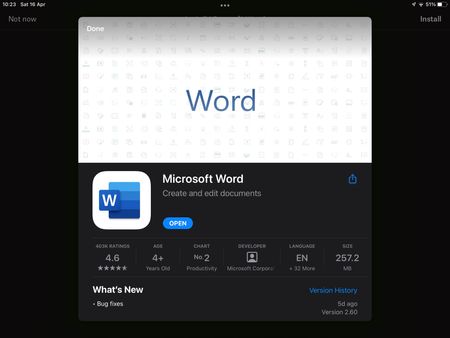
iOS Dropbox app won’t acknowledge Microsoft Word app
I’m on Dropbox version 274.2 and Microsoft Word version 2.60. Today I started having an issue where trying to open a Word doc in my Dropbox app prompts me to install Word, despite the app being insta...

LRBH
3 years agoExplorer | Level 4
No good - Dropbox is now refusing to acknowledge the Office app even right after a full reinstall. I can open my Dropbox files from inside the Office app, but not in Dropbox itself. Which is frustrating, because it means I can't use the "most recent" tab to quickly pick up where I left off.
I think I'm just going to have to wait for a bug fix. 🙁

Jenniferchristie
3 years agoHelpful | Level 5
It has now reverted for me too. The reinstall only fixed it temporarily. I’ve emailed Support. As you say, it looks like it will need to be fixed from the top.
.
.
 commonviet3 years agoExplorer | Level 3
I have the same problem
- Walter3 years ago
Dropbox Community Moderator
Hi all - thank you all for your updates.
If anyone is still affected by this, please let us know here so we can reach out via email to investigate further.
Happy Monday!
- LRBH3 years agoExplorer | Level 4
I'm not sure I'd call it FIXED, but it will now open Word docs so long as I have BOTH the Word and Office apps installed - it seems to need Word installed to unlock the file opening feature, then it opens the files in the Office app?? 🤷 It's an improvement at least.

About Integrations
Get help with third-party integrations from the Dropbox Community.
The Dropbox Community team is active from Monday to Friday. We try to respond to you as soon as we can, usually within 2 hours.
If you need more help you can view your support options (expected response time for an email or ticket is 24 hours), or contact us on X, Facebook or Instagram.
For more info on available support options for your Dropbox plan, see this article.
If you found the answer to your question in this Community thread, please 'like' the post to say thanks and to let us know it was useful!


