Your workflow is unique 👨💻 - tell us how you use Dropbox here.
Forum Discussion

LRBH
3 years agoExplorer | Level 4
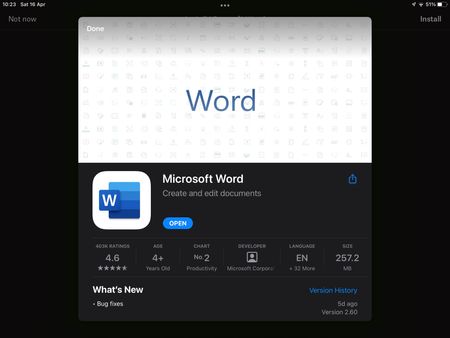
iOS Dropbox app won’t acknowledge Microsoft Word app
I’m on Dropbox version 274.2 and Microsoft Word version 2.60. Today I started having an issue where trying to open a Word doc in my Dropbox app prompts me to install Word, despite the app being insta...

Gazlaz
3 years agoExplorer | Level 4
Thanks for the reply.
It’s just when opening from Dropbox. I’ve cleared the cashe and still the same issue.
It’s just when opening from Dropbox. I’ve cleared the cashe and still the same issue.

Megan Dropbox Community Moderator
3 years agoDropbox Community ModeratorHey all, I hope you're doing well!
Can you clarify the version of the OS that you have installed, along with the version of the Dropbox app, please?
Keep me posted, and we'll take it from there.
 Zoltan3 years agoHelpful | Level 5
iPad OS 15.4.1 and Dropbox Version 276.2
 BigguyDan3 years agoExplorer | Level 4
Hi, I’ve got the same problem & I know of at least 5 other people with the same issue on various ipads & iphones. Deleting & reinstalling dropbox did solve the issue for 1 person but it returned within a few minutes.
Android devices don’t seem to be effected. Jelen3 years agoHelpful | Level 5On iPhone
Dropbox 274.2.2
OS 15.4.1
About Integrations
Get help with third-party integrations from the Dropbox Community.
The Dropbox Community team is active from Monday to Friday. We try to respond to you as soon as we can, usually within 2 hours.
If you need more help you can view your support options (expected response time for an email or ticket is 24 hours), or contact us on X, Facebook or Instagram.
For more info on available support options for your Dropbox plan, see this article.
If you found the answer to your question in this Community thread, please 'like' the post to say thanks and to let us know it was useful!


