Your workflow is unique 👨💻 - tell us how you use Dropbox here.
Forum Discussion

LRBH
3 years agoExplorer | Level 4
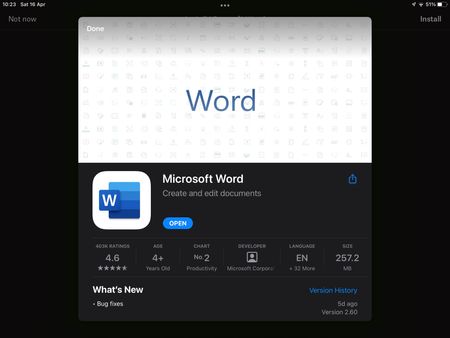
iOS Dropbox app won’t acknowledge Microsoft Word app
I’m on Dropbox version 274.2 and Microsoft Word version 2.60. Today I started having an issue where trying to open a Word doc in my Dropbox app prompts me to install Word, despite the app being insta...

Megan Dropbox Community Moderator
3 years agoDropbox Community ModeratorHi allenng, happy to see that your troubleshooting managed to resolve this!
Also, mduck314, can I ask the version of the OS and Dropbox app that you have installed to your device? Feel free to also send me a screenshot of the error message you see on your end when trying to preview the files.
Thanks a bunch!

Kerry12
3 years agoExplorer | Level 4
Also, I can open Microsoft and excel directly through their apps and get all of my documents there. But when I go through dropbox to open up excel or word, it asked me to install the app.
- Walter3 years ago
Hey Kerry12, sorry to jump in but, could you try the suggestion from this post and let me know if it worked for you?
 BigguyDan3 years agoExplorer | Level 4
Hi, tried that a few days ago but just like others reported it only temporarily fixed the problem.
However for no apparent reason today it has started working fine again for me although I fear that its only temporarily working again.
 Jelen3 years agoHelpful | Level 5I've check few hours ago and it doesn't work but now everything looks ok. Will se how situation will look tommorow. I hope it was fix pernamently 🙂

About Integrations
Get help with third-party integrations from the Dropbox Community.
The Dropbox Community team is active from Monday to Friday. We try to respond to you as soon as we can, usually within 2 hours.
If you need more help you can view your support options (expected response time for an email or ticket is 24 hours), or contact us on X, Facebook or Instagram.
For more info on available support options for your Dropbox plan, see this article.
If you found the answer to your question in this Community thread, please 'like' the post to say thanks and to let us know it was useful!


