Your workflow is unique 👨💻 - tell us how you use Dropbox here.
Forum Discussion

harlings
1 year agoExplorer | Level 3
My MS Word and Excel apps on iPad still show files I've deleted from Dropbox.
Dear All,
On my iPad I have the MS Word and Excel Apps installed, and under the recents tab I see links to files I've since deleted from Dropbox.
When I try to "Remove from Recent" nothing happen...

harlings
1 year agoExplorer | Level 3
Hi Nancy,
Sorry for the delay I've been trying many things, all of which failed.
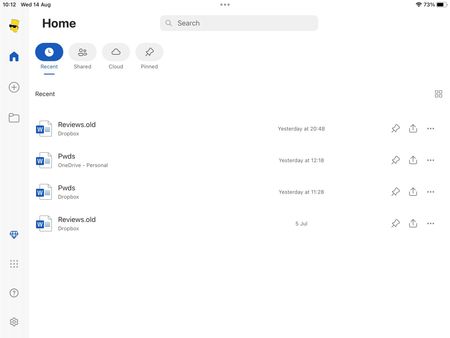
These are screenshots of my iPad on MS Excel trying to remove recent links..
The 2020.10 China is still on Dropbox but China.old was deleted recently. When I try to "remove from recent" nothing happens, no error message nothing!
Then this last one shows a folder called Provisional...237591809 wherever that turned up from, who knows?
The App version of Dropbox on my iPad is 390.2.2
Kind regards, Steve

Walter Dropbox Community Moderator
1 year agoDropbox Community ModeratorHey @harlings - thanks for the additional information and the screenshots too.
Have you tried clearing the cache of all the apps to see how it goes?
If you did and this persists, you might need to reach out to Microsoft directly for further assistance.
- harlings1 year agoExplorer | Level 3
Okay, so how do I clear out the cache from all apps on my iPad?
Steve- Walter1 year ago
While I can't suggest on the other apps, for the Dropbox app on your iPad, you can follow these steps:
- Open the Dropbox iOS app.
- Tap the account icon (person) in the bottom right.
- Tap the gear icon in the top right.
- Scroll down and tap Clear cache.
- Tap Clear cache again.
Once you’ve cleared the cache, log out of the Dropbox app, restart your device, then log back in.Let me know if that helped @harlings
- harlings1 year agoExplorer | Level 3
Hi Walter,
Tried that idea, now there's a pair of links pointing to my two Excel spreadsheets both of which I'm unable to remove from recent..
About Integrations
Get help with third-party integrations from the Dropbox Community.
The Dropbox Community team is active from Monday to Friday. We try to respond to you as soon as we can, usually within 2 hours.
If you need more help you can view your support options (expected response time for an email or ticket is 24 hours), or contact us on X, Facebook or Instagram.
For more info on available support options for your Dropbox plan, see this article.
If you found the answer to your question in this Community thread, please 'like' the post to say thanks and to let us know it was useful!


