Your workflow is unique 👨💻 - tell us how you use Dropbox here.
Forum Discussion

Scott H.
6 years agoCollaborator | Level 9
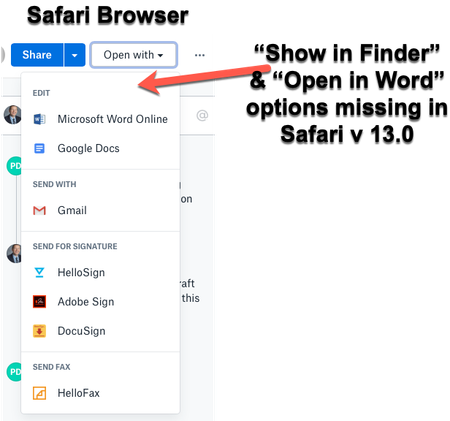
"Open in Finder" and "Open in Word" not showing in Safari OSX for Mac
Hey folks,
When viewing dropbox files from the Safari browser (Safari v 13.0) I can no longer see the "Show in Finder" or 'Open in Word" / "Open in Adobe Acrobat" options for files.
I also have ...

Daphne Dropbox Community Moderator
6 years agoDropbox Community ModeratorAwesome!
I've reached out to your email, please just check your inbox when you have a moment and we'll take it from there.
Cheers!

redegg
6 years agoNew member | Level 2
I'm having the same problem as well. Can you please let me know when a solution is found?
 Scott H.6 years agoCollaborator | Level 9
Hi redegg
Sadly there's still no solution to this despite the issue being raised back in September. Whern I raised this issue with Dropbox Advanced Support they dismissed the issue as a third-party software issue... (I am confident that this isn't the case).
Our whole organisation is affected by this and it seems that others outside of our organisation who use safari as their browser of choice are also affected.
It's a very dissapointing usder-expoerience considering the significant amount of money I pay for a Dropbox Professional Subscription.
All the best for a solution. Let me know if you find one...
Scott
- Daphne6 years ago
Hey peeps, thanks for all your updates here!
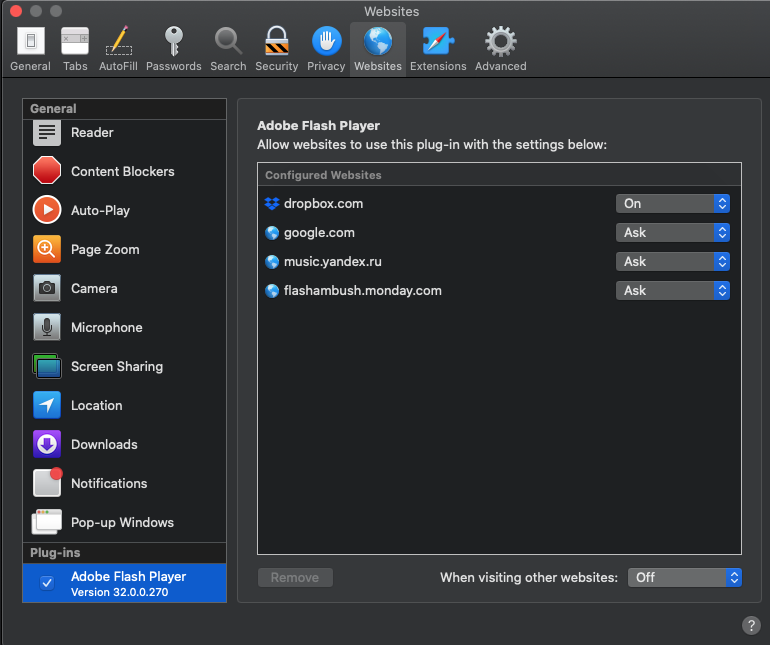
I'd just like to ask, redegg and tsigel, do you both have Flash Player 10 or later installed and enabled on the Safari browser?
If you open Dropbox in an incognito/private window, do you still have the same issue?
Let me know and we'll take it from there - thanks!
- Daphne6 years ago
Thanks for getting back to me here tsigel!
So we can have a better look into this with some device specific info, I've reached out to your email address linked to your Community profile.
Please just check your inbox when you have a second and we'll take it from there if you'd like to.
Cheers!
 up123456 years agoHelpful | Level 5
Is there any solution to this? There is nothing on these forums other than installing/reinstalling dropbox or flash, none of which resolves the problem.
- Daphne6 years ago
Hey there up12345, thanks for joining us here!
I'd be more than happy to do some investigation into this with you, if you'd like to of course.
I've reached out to your email linked to you Community profile. Please just check your inbox when you have the chance and we can go from there.
Let me know if you have any other questions - thanks!
- WildfireQueen6 years agoHelpful | Level 7
Yes I agree: my colleagues using Safari have the issue as well. But I've been emailing with Dropbox support and providing info, so hopefully it will be fixed soon!
 gguerre6 years agoExplorer | Level 4
Just want to pipe up that I have this problem too. I would appreciate it if Dropbox staff make sure to post a response here once it's resolved. Thanks for keeping everyone updated Scott H.
- Daphne6 years ago
Thanks for joining us here gguerre!
If you'd like to do some investigation into this with us, I've reached out to your email linked with your Community profile.
If you have the time (and would like to of course), please feel free to just check your inbox and reply back to me there.
Thanks!
- pmcmillan6 years agoHelpful | Level 5
theHas there been any updates on this? We are having the same problem as well.
- Lusil6 years ago
Dropbox Staff
Hi pmcmillan, thanks for nudging us and sorry to hear that you're also having trouble with this.
I'd be more than happy to help look into this with you, so I've sent you a ticket to the email address connected to your Community profile.
When you have the chance, please check your inbox for my message and we'll take it from there. Cheers!
- kmanlove6 years agoNew member | Level 2
I'm having this same issue despite lots of troubleshooting as well.
- Scott H.6 years agoCollaborator | Level 9
Hi kmanlove ,
Sorry to hear that you are also having trouble. My issue still persists and has done for several months now. It is very frustrating that Dropbox don't seem able (willing?) to fix this as it is clearly an issue for many of us.
Let me kow if you find a fix.
Cheers.
- pmcmillan6 years agoHelpful | Level 5
My issue persists as well. They have suggested that I use the Dropbox app but that doesn't help for me and my team - we often share URL links and they open in Safari, but we then can't look at the file in Finder or open in the native app. They update me every week or two to tell me they are still looking into it :(
- Daphne6 years ago
Hey peeps, thanks for all your updates here on this!
If you'd like to do some investigation into this kmanlove, I've reached out to the email linked with your Community profile.
I'd be happy to look into this with you, so please just check your inbox when you have a moment and we can go from there.
Thanks!
- Jamesr16 years agoHelpful | Level 6
Hi - I'm having the exact same issue using Safari and not getting the Open In Finder button. It would also be great to have a button in dropbox.com that says Open in Dropbox App (either file or folder). We use links to fast track easy access to files on our Dropbox Team, which now takes ages as the links are pretty much redundant if the file can't be opened locally and has to be searched...
- Daphne6 years ago
Hey Jamesr1, thanks for joining the discussion here!
So we can do a little investigation into this and send this along to our specialists, we would need to continue through our Support channel.
I was able to locate your open ticket with our team, and I've taken over the case and followed up with you there.
When you have a moment, please just check your inbox for my message and we'll take it from there.
Thanks!
- pmcmillan6 years agoHelpful | Level 5
Daphne - the only response we ever receive is that you will take the problem offline, but when we do (it appears) there is no resolution. Can Dropbox point to any users that are successfully able to use "Open in Finder" on the latest versions of Safari, or is it safe to assume that this is a problem that no one is working to solve?
- Scott H.6 years agoCollaborator | Level 9
Good question pmcmillan!
I hope that Daphne is able to give us a response to this. The issue with not being able to open files in finder or office desktop apps from Safari has gone unaddessed for too long and is starting to erode my confidence in the Dropbox product.
Cheers,
Scott
- Fiona6 years ago
Hey everyone.
My colleague Daphne is not here today and I wanted to touch back with you to let you know that we are currently looking into this.
We understand how Safari is a favorite everyday tool for all of you and we want you to have a great Dropbox experience using it. Technical issues occur and we are glad you are reporting them in our Community. A special thanks to all of you that have created tickets with us. You help us investigate!
Once we have more information on this browser issue, we'd be glad to share it with you. In the meantime, please use another browser.
Thank you for bringing this to our attention and for your feedback.
 Michael W.6 years agoExplorer | Level 4
I can confirm on latest Mojave and Safari 13.0.4, this issue still persists. Ironically, I even had Flash turned off but still saw the open button. However, I can't even get the doc to open in Word Online. I just get stuck in a loop from dropbox.com to office.live.com. Tried emptying cache, disabling extensions, opening in private window, and loggin out of office 365. Yes, I also turned on Flash. Works fine in Chrome. Ugh. Going to contact support because I at least need to figure out this loop I get stuck in.
- Daphne6 years ago
Hey Michael W., thanks for joining us here!
I was able to find your ticket with our Support team and let them know your comments here, just to keep them in the loop.
This is something that we're looking into at the moment, so thank you for taking the time to reach out to us with this as it will help the team with their investigation.
If there's anything else that you need in the meantime, give me a nudge here and I'd be happy to help.
Hope you all have a great weekend ahead!
 and i tried i

About Integrations
Get help with third-party integrations from the Dropbox Community.
The Dropbox Community team is active from Monday to Friday. We try to respond to you as soon as we can, usually within 2 hours.
If you need more help you can view your support options (expected response time for an email or ticket is 24 hours), or contact us on X, Facebook or Instagram.
For more info on available support options for your Dropbox plan, see this article.
If you found the answer to your question in this Community thread, please 'like' the post to say thanks and to let us know it was useful!


