Your workflow is unique 👨💻 - tell us how you use Dropbox here.
Forum Discussion

AGallo
4 years agoHelpful | Level 5
Unable to add comments to Google Docs
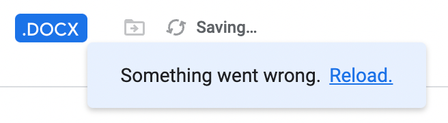
While working on Google Doc files that I created within Dropbox, I am unable to successfully utilize the "add comments" feature. I am able to insert a comment and type information into the comment bo...
- 3 years ago
Hello everyone,
Thank you for your patience. We are happy to say that this issue appears to have been resolved. If you have any other issues, please feel free to reach out to our support team, or open a new thread in the community.


AGallo
4 years agoHelpful | Level 5
Megan This appears to be a widespread issue impacting many Dropbox users. What's the current status of this ticket? How can we escalate it for speedy resolution?

Megan Dropbox Community Moderator
4 years agoDropbox Community ModeratorHey all, happy Friday I hope you're all doing well!
I'd appreciate it if you could open a ticket number by communicating with our Support team.
Once you do, feel free to send me the ticket ID you'll receive, so I can locate it on our system. If anyone has any issues while creating a ticket, let me know.
Thanks!
 Ranman4 years agoExplorer | Level 4
- AGallo4 years agoHelpful | Level 5
Megan I contacted Support yesterday and opened Ticket #15761752: Dropbox Support Chat.
After doings so, I noticed that the issue seems to have resolved itself, so I'll be closing out this ticket.
We were able to workaround the issue by: downloading the affected (Google Doc) file, working on it offline (in Word), then re-uploading to Dropbox. On the uploaded (and updated) version, we were able to to open in Google Docs and use the Comment tool.
- Emmet3 years ago
Community Manager
Hello everyone,
Thank you for your patience. We are happy to say that this issue appears to have been resolved. If you have any other issues, please feel free to reach out to our support team, or open a new thread in the community.

About Integrations
Get help with third-party integrations from the Dropbox Community.
The Dropbox Community team is active from Monday to Friday. We try to respond to you as soon as we can, usually within 2 hours.
If you need more help you can view your support options (expected response time for an email or ticket is 24 hours), or contact us on X, Facebook or Instagram.
For more info on available support options for your Dropbox plan, see this article.
If you found the answer to your question in this Community thread, please 'like' the post to say thanks and to let us know it was useful!


