Your workflow is unique 👨💻 - tell us how you use Dropbox here.
Forum Discussion

hopinvaca
2 years agoNew member | Level 2
ASUS 500GB Promotion
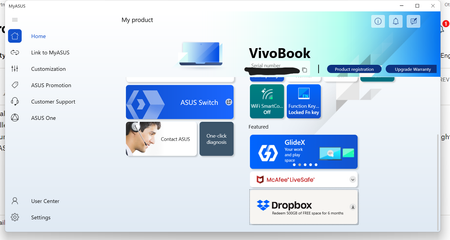
I did all the setting up from the new ASUS computer promotion for the free 500Gb of space for 6 months. I clicked the 500 free space that was installed on my new ASUS and followed all the steps from ...

Sainev
2 years agoExplorer | Level 3
Hi guys, So i bought a new ASUS computer that was advertised as eligible for a 6-month free 500GB Dropbox storage promotion, then I followed the instructions to redeem the promotion, but currently my Dropbox account only have 2GB of storage space. I would appreciate it if you could investigate this issue and add the 500GB of storage to my account. Thank you for your time and attention to this matter.

Walter Dropbox Community Moderator
2 years agoDropbox Community ModeratorHey Sainev - sorry to hear you're having issues with this.
Could you confirm that you've followed these steps and that you've also completed the getting started steps when you created the account?
Thanks!
- Sainev2 years agoExplorer | Level 3Hi, yeah I already followed those steps, I installed and registered the Dropbox app through MyAsus app.
I haven't completed the getting started steps, I will do it now then I will get back to you.
Thanks a lot - Sainev2 years agoExplorer | Level 3
Hi there, I've completed the getting started steps, and the 500GB storage upgrade hasn't been applied yet. Currently, my storage is at 2.25GB, which is only a 250MB increase. Could you please assist me with this issue?

About Plans and Subscriptions
Ask the Dropbox Community for help if you have questions about your Dropbox plan or subscription. Find solutions and share advice with members.
The Dropbox Community team is active from Monday to Friday. We try to respond to you as soon as we can, usually within 2 hours.
If you need more help you can view your support options (expected response time for an email or ticket is 24 hours), or contact us on X, Facebook or Instagram.
For more info on available support options for your Dropbox plan, see this article.
If you found the answer to your question in this Community thread, please 'like' the post to say thanks and to let us know it was useful!


