Your workflow is unique 👨💻 - tell us how you use Dropbox here.
Forum Discussion

skarl
1 year agoExplorer | Level 3
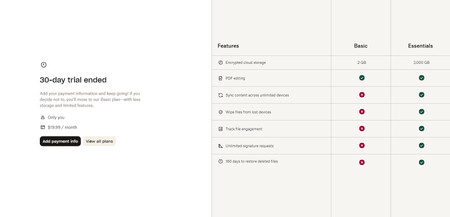
I'm unable to use my free Dropbox account, because of "30 day free trial has ended" pop-up.
Please help me get rid of this annoying pop-up that has no exit button. I have a free basic plan of 2GB and I have only used 38.8MB of storage. Now, I cannot navigate my account because this pop-up s...

Nancy Dropbox Community Moderator
1 year agoDropbox Community ModeratorI’m sorry to hear about this, skarl. Let’s have a look.
First off, can you send me a full screenshot of what you see on your screen?
Does this window pop up right after you log in to your Dropbox account online?
Can you also click on this link and let me know if you can access your Plan tab without this window popping up again?
Let me know how it goes.
 skarl1 year agoExplorer | Level 3
Hi Nancy,
That is the full screenshot of what pops up when trying to navigate my free account. The screenshot in my original question covers the entire screen. This pop-up comes up covering the entire screen after I log in and try to click on anything in my account.
I can access the link you provided without it popping up, but if I want to go to my homepage, it pops up again and covers the entire screen.
Please help, this has been an ongoing problem that should not be happening.
- Nancy1 year ago
Thanks for giving that a go. Can you try one more thing with me?
I'd like you to click on the “View all plans” button and let me know if you can access your Dropbox account after that (when going to your Home page).
- skarl1 year agoExplorer | Level 3
Thanks for the quick response. I did that and it provides only paid options. I click onto the home page again and it does the same thing by popping up with the original ad.
About Plans and Subscriptions
Ask the Dropbox Community for help if you have questions about your Dropbox plan or subscription. Find solutions and share advice with members.
The Dropbox Community team is active from Monday to Friday. We try to respond to you as soon as we can, usually within 2 hours.
If you need more help you can view your support options (expected response time for an email or ticket is 24 hours), or contact us on X, Facebook or Instagram.
For more info on available support options for your Dropbox plan, see this article.
If you found the answer to your question in this Community thread, please 'like' the post to say thanks and to let us know it was useful!


