Your workflow is unique 👨💻 - tell us how you use Dropbox here.
Forum Discussion

seahawk
3 years agoNew member | Level 2
Why is Dropbox asking me to upgrade my account?
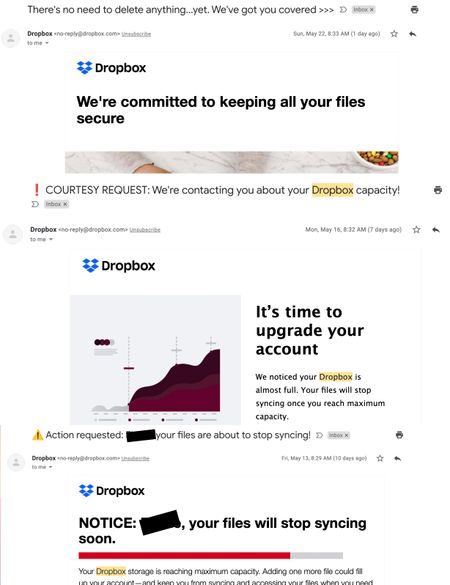
In the last week, I received three marketing emails from dropbox aimed at getting me to upgrade my account thinly veiled as alternately alarmist alerts and courtesy reminders about my account reachin...

IronOre
2 years agoNew member | Level 2
Please STOP pushing marketing / advertisements with notifications. At the very least, let me opt-out of marketing spam. This is a gross misuse of notices, which I expect to be something IMPORTANT about my account - for example, a potential security breach. I am forced to either turn off all notifications and risk missing important messages or leave notifications on and continue getting constantly interrupted with upsell SPAM. I deleted my Uber account because of the nonsense. STOP IT !!!
- Megan2 years ago
Dropbox Community Moderator
Hi IronOre, sorry to hear about that!
In regards to the notifications that you mentioned, could you clarify where do you see them? Is it in email notifications, in the app or website?
Also, are they notifications about possibly upgrading your account to a different plan?
Keep me posted, and we'll take it from there!
- IronOre2 years agoNew member | Level 2
I'm getting notifications from the app on my iPhone & iPad about family upgrade offers and tax season. When I go to Settings > Notifications > DropBox - I can only turn on or off notifications - there is no way to limit notifications, removing marketing msgs. What makes this upsetting is that I rely on notifications to inform me about potential issues with my account that require my immediate attention - for example, a login I didn't perform. Like I said in my post, I had to delete my Uber account due to this misuse of notifications. Right now, I've turned-off notifications for DropBox to eliminate the spam - with the risk of missing important notices.

About Plans and Subscriptions
Ask the Dropbox Community for help if you have questions about your Dropbox plan or subscription. Find solutions and share advice with members.
The Dropbox Community team is active from Monday to Friday. We try to respond to you as soon as we can, usually within 2 hours.
If you need more help you can view your support options (expected response time for an email or ticket is 24 hours), or contact us on X, Facebook or Instagram.
For more info on available support options for your Dropbox plan, see this article.
If you found the answer to your question in this Community thread, please 'like' the post to say thanks and to let us know it was useful!


