Our Community is in read-only mode until April 8th, learn more here. You can still search existing threads or get help via Dropbox Support, the Dropbox Help Center, or Learn.
Forum Discussion

StitchG
1 year agoNew member | Level 2
Can't change my Dropbox account email to a Gmail address
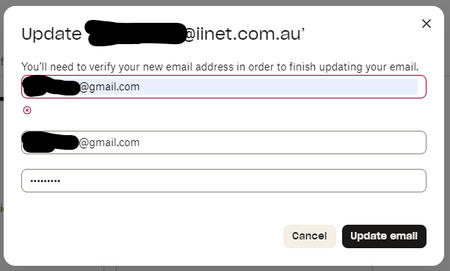
Hi, I am trying to change me email to a gmail address, but the dialog when pressing 'Update email' sets a red ring around the 'new email' entry field and just has a small red cross below it with no ...
- 1 year ago
Is it possible that the Gmail address is currently being used by another Dropbox account already?
Have you attempted to login to Dropbox using that email, or tried to reset a password for it?

Jay Dropbox Community Moderator
1 year agoDropbox Community ModeratorIs it possible that the Gmail address is currently being used by another Dropbox account already?
Have you attempted to login to Dropbox using that email, or tried to reset a password for it?

StitchG
1 year agoNew member | Level 2
Hmmm, I wouldn't have thought so.
OK, just checked and yes there is an account with this email (no idea how). I've done a password reset and logged on and it seems empty.
Should I delete this account and then change my email from the used account to this?
- Jay1 year ago
Yes, if there's nothing on that account and no other devices connected to the account, then go ahead and delete it. This would free up that email to let you change the email on that account.
- StitchG1 year agoNew member | Level 2
All done now, thanks very much for your help (but you may want to report than an error message should have been displayed)
 Austinl1 year agoNew member | Level 2
I'm getting that exact same error message when I try to change my email address
- Rich1 year ago
Super User II
Austinl wrote:
I'm getting that exact same error message when I try to change my email address
Have you checked to see if the new email address that you're trying to use already has a Dropbox account associated with it? Have you attempted to login to Dropbox using that email, or tried to reset a password for it?

About Settings and Preferences
The Dropbox Community is here to help if you have questions about your account settings and preferences. Learn and share advice with members.
The Dropbox Community team is active from Monday to Friday. We try to respond to you as soon as we can, usually within 2 hours.
If you need more help you can view your support options (expected response time for an email or ticket is 24 hours), or contact us on X, Facebook or Instagram.
For more info on available support options for your Dropbox plan, see this article.
If you found the answer to your question in this Community thread, please 'like' the post to say thanks and to let us know it was useful!


