We’re Still Here to Help (Even Over the Holidays!) - find out more here.
Forum Discussion

raymil
7 months agoNew member | Level 2
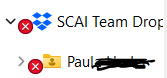
There's a red 'X' icon on two folders in File Explorer on two Windows devices
We’re experiencing an issue with Dropbox on two company laptops where certain folders specifically SCAI Team Dropbox and a subfolder labeled Paul are showing a red 'X' icon in File Explorer.
H...

Walter Dropbox Community Moderator
7 months agoDropbox Community ModeratorHey raymil - sorry to hear about your syncing issue.
Can you please take a look at this Help Center article and let me know if it helps at all?
If not, we'd need more information, such as the exact OS version of the affected computers and the status and version of the Dropbox desktop app as well etc.
In any case, please let me know what you find, Ray.
 raymil7 months agoNew member | Level 2
Hello Sir,
Here is the additional details. . .
Computer 1
Disk Total used: 475 GB
free: 160 GB (33%)
RAM: 8 GB
CPU Intel(R) Core(TM): i5-8350U CPU @ 1.70GHz
OS: Microsoft Windows 11 Pro
Model: Latitude 5590
Make: Dell Inc.
Dropbox: 223.4.4909
Computer 2
Disk Total used: 475 GB
free: 282 GB (59%)
RAM: 16 GB
CPU Intel(R) Core(TM): i7-10510U CPU @ 1.80GHz
OS: Microsoft Windows 11 Pro
Model: Iridium 15
Make: Carbon Systems
Dropbox: 224.4.4811
-Ray

About Settings and Preferences
The Dropbox Community is here to help if you have questions about your account settings and preferences. Learn and share advice with members.
The Dropbox Community team is active from Monday to Friday. We try to respond to you as soon as we can, usually within 2 hours.
If you need more help you can view your support options (expected response time for an email or ticket is 24 hours), or contact us on X, Facebook or Instagram.
For more info on available support options for your Dropbox plan, see this article.
If you found the answer to your question in this Community thread, please 'like' the post to say thanks and to let us know it was useful!


