We're making some changes to the Dropbox Community 👩💻 - Find out more here.
windows
23 Topics
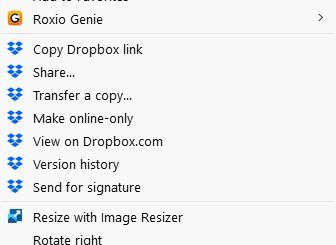
Is there a way to remove the Dropbox options from the context menu on Windows 11?
Operating System Windows 11 Question or Issue I would like to remove the Dropbox context menu items from my right-click context menu as I do not use them and they clutter up my menu. How do I go about removing them?36Views0likes1Comment
'Last Modified' column not showing date & time
When using Dropbox on a desktop, the "Last Modified" column now displays messages such as "10 minutes ago," "22 hours ago," and "last month." I found having it show the actual dates and times to be more useful. Is there a way to change the format of the column back to the way it was?Solved413Views2likes12Comments
How can I open Dropbox settings when the taskbar icon isn't showing?
The Dropbox taskbar button has disappeared recently (Win11 Pro), DB is running (syncing ok, processes running in task manager) and all icons are set to show in the taskbar so it's not a taskbar config issue. The only solution I've found suggested to this (other than the basic 'check your taskbar settings one) is uninstalling and reinstalling Dropbox but I'm very nervous about doing this as I have a VERY large archive with selective sync and I want to check the config to confirm exactly what is online only before trying the 'move archive out and back into folder after reinstalling' to avoid downloading everything. It would take days (if not weeks) to resync everything on my current connection.233Views0likes7Comments
Dropbox starts up when booting Windows, even when disabled in the preferences.
Question or Issue Had to do a clean reinstall of Win11, then added Dropbox. Changed the settings not to load at startup. I prefer to manually sync. But when I return to computer in the morning, I see Dropbox is loaded on the machine and I am logged in. Is there a way to make sure that Dropbox only runs when I decide to use it and sync? Thank you.310Views0likes2Comments
Can I remove the Dropbox context menu entries on Windows 11?
Device HP Laptop & HP Desktop Operating System/Browser (if using the web) Windows 11 Dropbox App Version (if using the app) 230.4.8797 Dropbox Plan N/A Question or Issue How do I get rid of the File Explorer extensions that keep showing up. I have no use for them and they just take up space:Solved450Views0likes5Comments
Remove Dropbox from Windows' context menu
I come again with to ask for an option to remove Dropbox entries from Window's context menu. The reason is I am visually impaired and I must use tools to have greater fonts showed in my screen. I must use also the magnifying glass and other availability resources. Then the 7 (seven!) context menu options that Dropbox has added to my Windows File Explorer context menú (in teh upper part of it) makes my context menu so difficult to access the bottom options of the list that I have serious problems to do my job. Believe me this should absolutely be an option the user should be able to deal with, and not an option forced by Dropbox. The topic was already raised in a previous post (Add option to remove Dropbox options from context menu) by Martsssssss and upvoted by six more people (see below) but has been closed by reasons I cannot understand (Inactivity?) It would be great to have it reopened and taken very seriously. Handicapped people like me will greatly thank it.610Views1like5Comments
Changing the location of my Dropbox folder on Windows 11
Question or Issue I am trying to change where the dropbox app looks for my files. I had to reset my Win 11 OS and reinstall the DropBox app, so it now points to c:\dropbox, instead of e:\dropbox where my files are actually located. Changing the folder in the desktop app fails because it says there is already stuff in e:\dropbox. There used to be a place in the web page settings that worked to change this, but I cannot find it now.219Views0likes1Comment
I got a popup on my device asking me to upgrade, even though notifications are off.
I have always left "Do not disturb" to on and disabled all app notifications in my windows 11 system settings. Today Dropbox posted a big popup in the center of the screen while I was doing something else. It was a notification that my free account was full and offered an option to upgrade or clear up space but no option to immediately close the window. It was also permanently on the foreground over top of other windows. I can't find any options to disable this from happening. All notifications in the desktop app are already set to off. This type of behaviour is totally unacceptable. If I can't find a solution and it happens again I will have to uninstall.546Views2likes7CommentsCannot set default sync state for new files to "available offline"
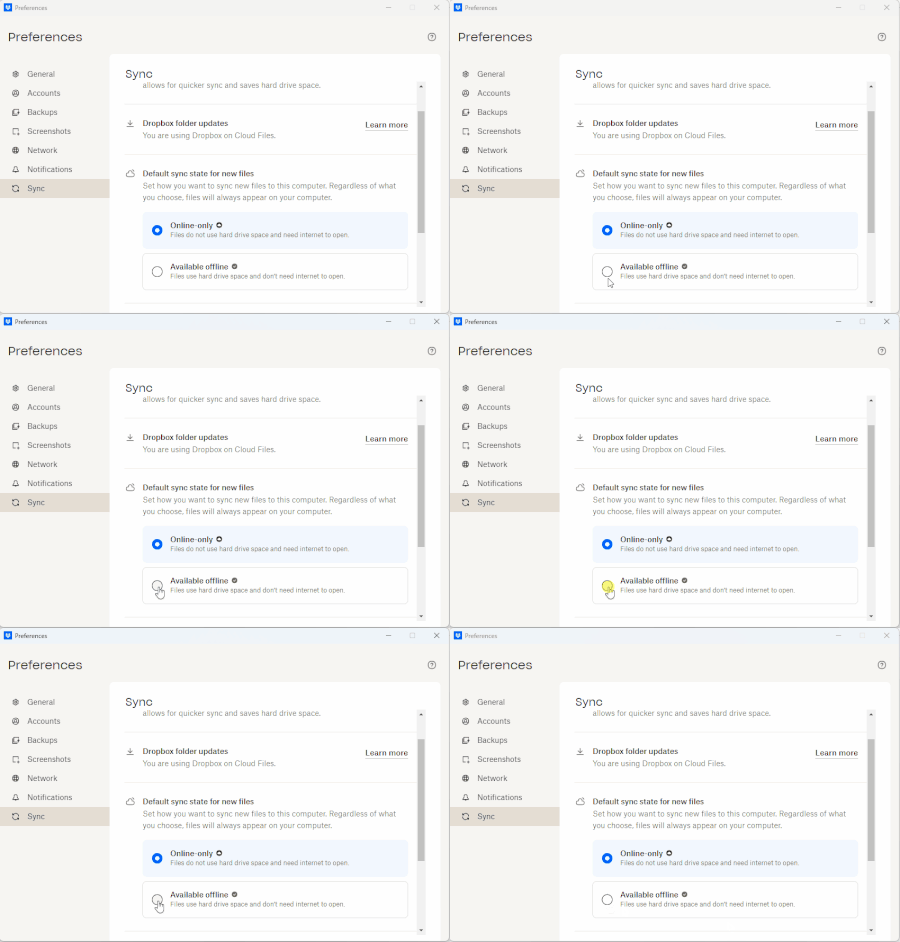
I am unable to select "Available offline" as the "Default sync state for new files" within the desktop application Preferences. I do have the ability through the "right click" menu to "Make available offline" or "Make available online-only" This was working in previous versions. I only noticed recently because someone shared a folder with me and it was not immediately available offline. Device Desktop Operating System/Browser (if using the web) Windows 11 Pro 24H2 Dropbox App Version (if using the app) 228.4.5567 Dropbox Plan Family494Views0likes9CommentsI keep receiving annoying sound notifications from my Win11 Dropbox app.
A few days ago, on my Win 11 PC, I started getting Dropbox notifications multiple times a minute. There were small information boxes that appeared for a while. I think that I changed a setting to stop the boxes, but still the annoying tone keeps sounding! I clicked on the icon in the system tray and clicked "pause syncing", but that did not stop the sound. I then clicked on my initials, then Preferences, then Notifications, and then turned off all notifications. The notification sounds (I assume they are notifications of some kind) persisted. The notifications on my Dropbox account (via Chrome) all seem to be email notifications, and probably not relevant. The only way that I can stop the notifications is if I choose the "Quit" option from the app (in the system tray). The syncing seems to be continuous. Mostly just 2 or 3 files, but then all of a sudden it shows over 500 files syncing, then it quickly drops to 2 or 3. I don't know if this is related, but for better security, I recently created an Admin account and downgraded my everyday account to a non-admin account. I think that the Dropbox issues happened before that change, but I am not 100% certain. Any help or ideas would be appreciated!Solved602Views0likes9Comments