Your workflow is unique 👨💻 - tell us how you use Dropbox here.
Forum Discussion

adebyrne
2 years agoNew member | Level 2
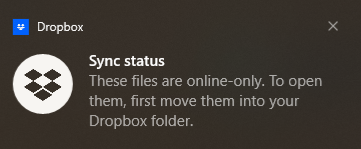
What is this Sync Status
Every 20 seconds - it's doing me head in
I can't seee what its trying to do
Adrian

Nancy Dropbox Community Moderator
2 years agoDropbox Community ModeratorHi adebyrne, welcome to the Community.
Just to clarify, are you taking any specific actions on your device, right before this notification appears, or does it show up on its own?
Have you restarted your computer, and the same thing keeps happening?
What’s the OS version of your computer, as well as your Dropbox app version?
Keep me updated.

adebyrne
2 years agoNew member | Level 2
Nope, started yesterday. I was doing some file copying as part of my google set up thats all. I have rebooted machine.
It's a win10 laptop
There's a bunch of dropbox processes running. I guess I could kill them but theyd restart
It's still doing it now, every 20 seconds
- Nancy2 years ago
Thanks for the screenshot! Can you try killing these processes, and let me know if there’s a difference?
Also, as per the notification above, did you try to make a copy of files that were online-only on Dropbox, without making them available offline first? If yes, then this is quite possibly what triggered this message.
 Christinasilk2 years agoHelpful | Level 5
Hi I am also having this problem. It seems to occur when I have One Drive (that I need for my work) open as well. Any suggestions?
- Megan2 years ago
Hey Christinasilk, welcome to our Community!
If you were able to isolate that this happens when you use OneDrive -which is kind of expected to have issues when you use two cloud providers- then I'd suggest you try to use them individually.
What I mean is that you can close OneDrive when you sync content to Dropbox, sync the files you need, open or edit them with us, and then open OneDrive and vice versa.
I hope this helps!

About Settings and Preferences
The Dropbox Community is here to help if you have questions about your account settings and preferences. Learn and share advice with members.
The Dropbox Community team is active from Monday to Friday. We try to respond to you as soon as we can, usually within 2 hours.
If you need more help you can view your support options (expected response time for an email or ticket is 24 hours), or contact us on X, Facebook or Instagram.
For more info on available support options for your Dropbox plan, see this article.
If you found the answer to your question in this Community thread, please 'like' the post to say thanks and to let us know it was useful!


