Your workflow is unique 👨💻 - tell us how you use Dropbox here.
Forum Discussion

RS2020
3 years agoHelpful | Level 6
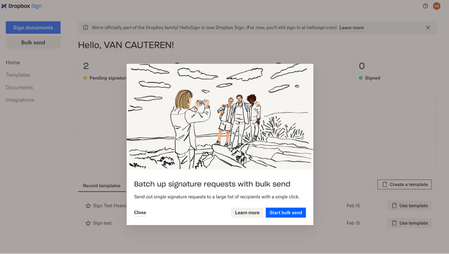
Dropbox Sign Bulk send sign requests not working
Dropbox is Promoting Unlimited Bulk Sing requests. They even added a button called 'Bulk send'. But whatever I do, I don't see the option to send one document to a CSV list.
They even have an ...
 3 years ago
Update 2: (Solved)
The Bulk send feature is unlocked (via support) and I managed to send 1100 sign requests in 5 batches of max 250 requests via a CSV export over a period of several hours. Dropbox still has a limit but thanks to Dropbox support (Lyn) I could send every 30min 250 requests.
I hope this post can help others!
Thanks for the help!

Jane
2 years agoNew member | Level 2
I have exactly the same issue with not being able to send bulk emails. I've just spent a lot of time looking into who was best to use and decided to spend my money with Dropbox sign to find it doesn't do what it says it will. I too followed all of the Help center guidance and nope, this has still not been addressed for new users. I now cannot complete a task that was supposed to have been done urgently. To say i am disappointed is putting it mildly

Walter Dropbox Community Moderator
2 years agoDropbox Community ModeratorHey Jane, sorry to hear you're having issues with this and thanks for taking the time to share your thoughts on this.
Have you tried reaching out to our support team through this link for further assistance?
If not, let me know and I'll be happy to open a ticket for you from my end so that we can have a further look internally.
- Jane2 years agoNew member | Level 2
Yes i've tried that and various other things but i'm getting nowhere. I've just been sent a link to activate my sign plan which i tapped then it took me to a page for the credit card again but it says nothing is due. I'm so confused and annoyed that when i was interested in buying it i had an online chat with someone answering my questions, yet now i've bought it, i can't get any help
About Dropbox Sign

Ask questions and get help with Dropbox Sign here.
The Dropbox Community team is active from Monday to Friday. We try to respond to you as soon as we can, usually within 2 hours.
If you need more help you can view your support options (expected response time for an email or ticket is 24 hours), or contact us on X, Facebook or Instagram.
For more info on available support options for your Dropbox plan, see this article.
If you found the answer to your question in this Community thread, please 'like' the post to say thanks and to let us know it was useful!


