Your workflow is unique 👨💻 - tell us how you use Dropbox here.
Forum Discussion

djaffee
2 years agoExplorer | Level 3
There are no folders in Save to Folder in Signature
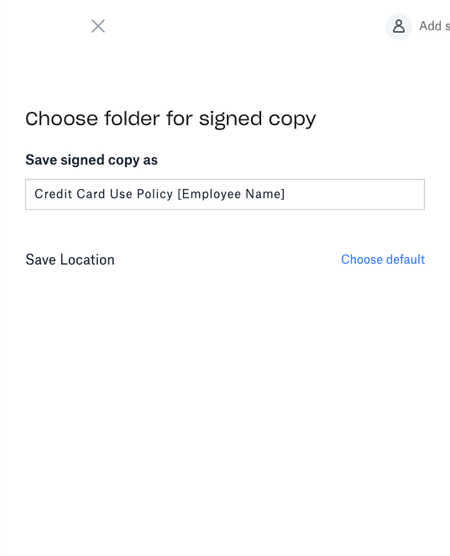
I've just added a new member to our company DropBox and given her access to use a template in Signature. When she gets to the Save to Folder page, there are no folders available to her. There are no ...

Megan Dropbox Community Moderator
2 years agoDropbox Community ModeratorHi djaffee, welcome to our Community!
Can you clarify if you wish for them to be able to use a specific template on Dropbox Sign, or sign a document?
Provided it's something different, let me know more.
Also, which page do they use on their end, in order to achieve that?
Keep me posted, and we'll take it from there!

djaffee
2 years agoExplorer | Level 3
This user is trying to use an existing template to send to an employee. As an Admin, I have logged in to her DropBox, and she has all the existing folders in our team space, but she sees nothing when indicating where to save the document she is attempting to send. (See screen shot above.)
When you say what page, I'm assuming you mean the Signatures tab?
- Hannah2 years ago
Hey djaffee, sorry to jump in!
Has your this member of your team tried this through a different browser, to see if they get a different behavior?
- djaffee2 years agoExplorer | Level 3
I will have her test this out Hannah, thanks for the suggestion. When I log in to her account as an Admin, I am using Google Chrome and I am not seeing the folders. But if I am logged in as myself, I do see the folders.
- djaffee2 years agoExplorer | Level 3
Hannah My user says she is using Firefox, but also tried on Microsoft Edge and same problem.
- Nancy2 years ago
Hope it's OK to jump in, djaffee.
Just to make sure we’re on the same page; is this happening on www.dropbox.com > Signatures tab, or when logging in to Dropbox Sign instead?
Can you send me a full screenshot of what the user sees on their end, especially when clicking on the “Choose default” link?
We’ll take it from there.


About Dropbox Sign

Ask questions and get help with Dropbox Sign here.
The Dropbox Community team is active from Monday to Friday. We try to respond to you as soon as we can, usually within 2 hours.
If you need more help you can view your support options (expected response time for an email or ticket is 24 hours), or contact us on X, Facebook or Instagram.
For more info on available support options for your Dropbox plan, see this article.
If you found the answer to your question in this Community thread, please 'like' the post to say thanks and to let us know it was useful!


