Need to see if your shared folder is taking up space on your dropbox 👨💻? Find out how to check here.

Martsssssss
12 months agoNew member | Level 1
Status:
Closed - Inactive
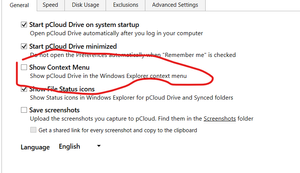
Add option to remove Dropbox options from context menu
As title mention. It feels like invasive when a program does thing like that in your computer and you have no control over it - I made a cleanup of my context menus and only Dropbox offers no option ...

lamoidfl
7 months agoHelpful | Level 5
I opened a new idea a few days ago that is the same as this one. I did not see this one until just now. Here is the gist of my comments. In my new idea I also expressed my anger at dropbox for its unwillingness to make this change for years. But I did not include that here.
------------------------------
Dropbox continues to force a navigation pane icon into Windows Explorer without providing any user-facing option to disable or reposition it. Even after I remove it from the registry, Dropbox re-inserts it on every update or restart.
This is an unacceptable override of user system preferences and violates UI conventions by prioritizing your brand icon above system drives. I demand an official method to disable or reposition this icon permanently, or at least an acknowledgment that users should retain control over their own file browser UI.