We’re Still Here to Help (Even Over the Holidays!) - find out more here.
Forum Discussion

donnybrook37a
4 years agoNew member | Level 2
I can't start the desktop app on Windows as I'm getting a permissions error
running windows 10 Prp Version 21H1

WickedFeline
3 years agoExplorer | Level 3
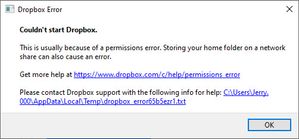
This just started yesterday after turning my computer on (Windows 11), Dropbox appears to try and start, and then I get a pop up showing
I've gone through the usual items, running as Admin, re-installing, performing an advanced re-installation as per the links. And now I'm stumped. Anyone have any ideas?
Log File Contents
bn.BUILD_KEY: Dropbox
bn.VERSION: 182.3.6250
bn.constants.WINDOWS_SHELL_EXT_VERSION: 64
bn.is_frozen: True
machine_id: 1a49cc59-f1b9-44df-b13c-26ae8ec30c89
pid: 26452
cwd: 'C:\\Program Files (x86)\\Dropbox\\Client'
real_path='C:\\Program Files (x86)\\Dropbox\\Client'
mode=0o40777 uid=0 gid=0
parent mode=0o40777 uid=0 gid=0
HOME: None
appdata: 'C:\\Users\\***\\AppData\\Local\\Dropbox\\instance1'
real_path='C:\\Users\\***\\AppData\\Local\\Dropbox\\instance1'
mode=0o40777 uid=0 gid=0
parent mode=0o40777 uid=0 gid=0
dropbox_path: 'E:\\Dropbox'
real_path='E:\\Dropbox'
mode=0o40555 uid=0 gid=0
parent mode=0o40777 uid=0 gid=0
sys_executable: 'C:\\Program Files (x86)\\Dropbox\\Client\\Dropbox.exe'
real_path='C:\\Program Files (x86)\\Dropbox\\Client\\Dropbox.exe'
mode=0o100777 uid=0 gid=0
parent mode=0o40777 uid=0 gid=0
trace.__file__: 'C:\\Program Files (x86)\\Dropbox\\Client\\182.3.6250\\python-packages.zip\\dropbox\\client\\ui\\common\\boot_error.pyc'
real_path='C:\\Program Files (x86)\\Dropbox\\Client\\182.3.6250\\python-packages.zip\\dropbox\\client\\ui\\common\\boot_error.pyc'
not found
parent not found
TMP: C:\Users\***\AppData\Local\Temp
TEMP: C:\Users\**\AppData\Local\Temp
tempdir: 'C:\\Users\\**\\AppData\\Local\\Temp'
real_path='C:\\Users\\**\\AppData\\Local\\Temp'
mode=0o40777 uid=0 gid=0
parent mode=0o40777 uid=0 gid=0
Traceback (most recent call last):
File "desktop/dropbox/client/main.py", line 5361, in _setup_root_for_account
File "desktop/dropbox/foundation/futures/basic.py", line 965, in result
File "desktop/dropbox/sync_root/manager.py", line 330, in convert_root
File "desktop/dropbox/sync_root/handlers/windows/cloud_files.py", line 341, in migrate
PermissionError: [WinError -2147024891] Access is denied
- Hannah3 years ago
Dropbox Community Moderator
Thanks for letting us know, WickedFeline.
Do you have any security program that might be blocking Dropbox? Like an antivirus, VPN, firewall etc.?
If so, try disabling them, to see if that helps.
- WickedFeline3 years agoExplorer | Level 3
Hi Hannah,
I have the built in Windows Firewall, and AVG as my Anti-virus, which I have disabled and tried to run dropbox with as well, but I still get the same message appearing.
It works fine on my laptop, so I don't believe its an account issue, but something that is happening simply with what is on my desktop.- Megan3 years ago
Hi WickedFeline, can you also try to follow these steps for an advanced re-install, and let us know how it goes?


About Apps and Installations
Have a question about a Dropbox app or installation? Reach out to the Dropbox Community and get solutions, help, and advice from members.
The Dropbox Community team is active from Monday to Friday. We try to respond to you as soon as we can, usually within 2 hours.
If you need more help you can view your support options (expected response time for an email or ticket is 24 hours), or contact us on X, Facebook or Instagram.
For more info on available support options for your Dropbox plan, see this article.
If you found the answer to your question in this Community thread, please 'like' the post to say thanks and to let us know it was useful!


